Track progress, take quizzes and save notes on this lesson.

Free forever · no card needed

Start free
Foundational

Software Classification: System Software and Applications

3.4.1 Hardware and software·3.4.3 Software classification

Aligned to the AQA 8525 specification

Level
Foundational
Reading time
8 min
Published
9 June 2026
Updated
1 July 2026
On this page
  1. 1.Hardware and Software
  2. 2.Types of Software
  3. 3.The Operating System
  4. 4.Utility Programs
  5. 5.Application Software
  6. 6.Common Exam Mistakes

Key takeaways

  • Hardware is the physical components that can be touched, while software is the programs and instructions that tell the hardware what to do; the two are interdependent and neither functions without the other.
  • Software falls into two categories: system software, which manages hardware resources and provides a platform, and application software, which performs tasks directly for the end user.
  • The operating system manages five resources: processor(s), memory, input/output devices, applications, and security; describing it as just 'managing files' is incomplete.
  • System software includes the operating system, device drivers, and utility programs such as antivirus, file compression, disk defragmenter, backup and encryption software.
  • Disk defragmentation benefits magnetic HDDs whose read head moves physically, but SSDs have no moving parts so defragmenting one gives no benefit and wastes write cycles.

Hardware and Software

A computer system is made up of two inseparable components: hardware and software. Neither is useful without the other.

Hardware refers to the physical components of a computer system — any part that can be touched. Examples include the processor (CPU), memory chips (RAM), storage devices (hard drive, SSD), screen, keyboard, and speakers.

Software refers to programs — sets of instructions that tell the hardware what to do. Software has no physical form; it exists as data stored in memory or on storage devices.

The relationship between hardware and software:

HardwareSoftware
Physical componentsPrograms and instructions
Cannot change its behaviour without new hardwareChanges hardware behaviour by providing new instructions
Useless without instructionsUseless without hardware to run on
Examples: CPU, RAM, keyboard, screenExamples: operating system, browser, game

Embedded systems (extra context — 3.4.5, not 3.4.1/3.4.3): Many devices contain a computer system dedicated to a single function — these are called embedded systems. A washing machine controller, a car engine management system, and a digital thermostat are all examples. Unlike a general-purpose computer, an embedded system runs a fixed program stored in its memory. Embedded systems are relevant elsewhere in the computer systems topic, particularly when discussing assembly language and low-level hardware control.

Software is what makes the same piece of hardware behave differently. The same CPU runs a word processor, a game, and a web browser — the hardware is identical, the software determines the behaviour.

Types of Software

All software falls into one of two categories:

System software manages the hardware resources of the computer and acts as a platform on which application software can run. Users interact with system software indirectly — it operates largely in the background.

Application software performs end-user tasks. It is what users directly interact with to get things done.

System softwareApplication software
PurposeManages hardware resources; provides a platform for applicationsPerforms a task for the end user
Who interacts with itMostly the computer itself, indirectly by the userDirectly by the user
ExamplesOperating system, device drivers, utility programsWord processor, web browser, game, video editor

System software must load and run before application software can start. When a computer powers on, the operating system (a type of system software) initialises the hardware and provides the environment in which applications run.

The Operating System

The operating system (OS) is the most important piece of system software. It manages all hardware resources and acts as an intermediary between hardware and application software.

The OS manages:

ResourceWhat the OS does
Processor(s)Decides which programs run and for how long; schedules tasks
MemoryAllocates RAM to running programs; ensures programs do not interfere with each other's memory
Input/output (I/O) devicesCommunicates with keyboards, screens, printers, and other devices using device drivers
ApplicationsLoads, runs, and terminates programs; manages multiple running applications simultaneously
SecurityControls access to the system; manages user accounts and permissions

Examples of operating systems: Windows, macOS, Linux, Android, iOS.

Without an OS, each application would need to include its own code to communicate directly with every possible hardware device — a keyboard, a mouse, a specific model of printer. The OS abstracts this complexity away, providing a consistent interface for applications.

A device driver is a small piece of software that allows the OS to communicate with a specific hardware device. The OS provides the framework; device drivers translate between the OS and individual pieces of hardware.

Utility Programs

Utility programs are a type of system software designed to perform specific maintenance, configuration, or support tasks on a computer system. They keep the system running efficiently and securely.

Common utility programs:

UtilityPurpose
Antivirus / anti-malwareScans for and removes malicious software; monitors for suspicious activity
File compressionReduces the size of files for storage or transmission (e.g. creating a .zip file)
Disk defragmenterReorganises fragmented data on a hard disk drive so files are stored contiguously, improving read speed
Backup softwareAutomatically copies files to a secondary location (external drive, cloud) to prevent data loss
Encryption softwareEncodes data so that it can only be read by someone with the correct key

Utility programs typically run in the background or are invoked when needed — the user does not interact with them in the same way as with application software.

Disk defragmentation is relevant to magnetic hard drives (HDDs), where the read head must physically move to access fragmented data. Solid-state drives (SSDs) do not benefit from defragmentation — they have no moving read head, so fragmentation does not cause the same slowdown. Defragmenting an SSD is unnecessary and can add avoidable write wear.

Want more lessons like this one?

Generate lessons on anything you study. Free account, no card needed.

Start generating

Application Software

Application software is software that performs a specific task for the end user. Unlike system software, it does not manage hardware resources — it uses the services provided by the OS to carry out its function.

Categories and examples:

CategoryExamples
ProductivityWord processor (Microsoft Word), spreadsheet (Excel), presentation (PowerPoint)
CommunicationEmail client, web browser, video calling app
EntertainmentVideo game, media player, streaming app
CreativePhoto editor, video editor, music production software
EducationalRevision app, e-learning platform, coding environment

Application software relies on the OS to:

  • Allocate memory for the application to run in
  • Provide access to input devices (keyboard, mouse, touchscreen)
  • Display output on the screen
  • Read from and write to storage devices

Worked example — layers of a computer system:
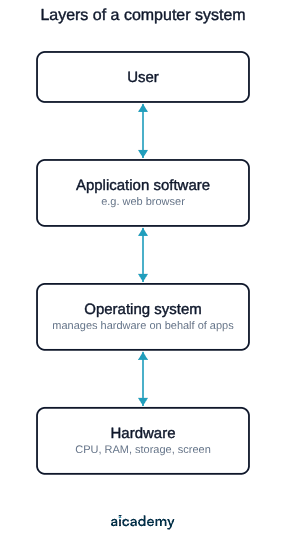
The user interacts only with the application. The application interacts with the OS. The OS interacts with the hardware. Each layer provides services to the layer above it.

Common Exam Mistakes

1. Confusing system software and application software

System software manages hardware resources and provides a platform — it operates largely in the background. Application software performs end-user tasks directly. The OS is system software; a word processor is application software. Describing the OS as an "application" is incorrect.

2. Listing the OS as the only type of system software

System software includes the OS, device drivers, and utility programs. Questions that ask for examples of system software expect more than just "the operating system."

3. Describing the OS as just "managing files"

The OS manages five things: processor(s), memory, I/O devices, applications, and security. File management is one small part of this — an exam answer limited to "manages files" is incomplete and will not gain full marks.

4. Stating that defragmentation improves SSD performance

Defragmentation benefits magnetic hard disk drives (HDDs) where the read head moves physically across a spinning platter. SSDs have no moving parts and are unaffected by fragmentation — running defragmentation on an SSD wastes the drive's limited write cycles without benefit.

5. Treating hardware and software as independent

Hardware and software are interdependent — neither functions without the other. Software needs hardware to execute on; hardware needs software to have any purpose. This relationship is a direct exam point.

Key terms

Hardware
The physical components of a computer system, any part that can be touched, such as the CPU, RAM, storage devices, screen and keyboard.
Software
Programs made up of sets of instructions that tell the hardware what to do; it has no physical form and exists as data.
System software
Software that manages the hardware resources of a computer and acts as a platform on which application software can run.
Application software
Software that performs a specific task for the end user and is directly interacted with, using the services provided by the OS.
Operating system
The most important system software, which manages all hardware resources and acts as an intermediary between hardware and application software.
Device driver
A small piece of software that allows the operating system to communicate with a specific hardware device.
Utility program
System software designed to perform specific maintenance, configuration or support tasks that keep the system running efficiently and securely.

Frequently asked questions

System software manages the computer's hardware resources and provides a platform for other programs to run on, operating largely in the background. Application software performs specific tasks directly for the end user, such as a word processor or web browser.

The operating system manages five things: the processor(s), memory, input/output devices, applications, and security. It schedules tasks, allocates RAM, communicates with devices via drivers, loads and terminates programs, and controls access through user accounts and permissions.

Defragmentation only helps magnetic hard disk drives, where a read head physically moves across a spinning platter to reach fragmented data. SSDs have no moving parts, so fragmentation does not slow them down, and defragmenting wastes the drive's limited write cycles.

Generate revision on any topic you study

Type any topic you're studying and Aicademy generates a complete lesson, quiz, and flashcard set, personalised to your level.

Lessons on anything

Structured, level-matched lessons on any topic you study

Practice quizzes

Find out what you actually know before the exam does

Flashcard sets

Lock in key concepts with instant revision cards

Ask Aica

Stuck on something? Get a clear explanation, any time

Prev

Data Compression: RLE and Huffman Coding

Next

Boolean Logic: Gates and Truth Tables

Related lessons

Top students don’t revise more. They revise what counts.

Start revising free

Free to start. No card needed.