Track progress, take quizzes and save notes on this lesson.

Free forever · no card needed

Start free
Intermediate

The Fetch-Decode-Execute Cycle

3.4.5 Systems architecture

Aligned to the AQA 8525 specification

Level
Intermediate
Reading time
8 min
Published
2 June 2026
Updated
1 July 2026
On this page
  1. 1.The Stored Program Concept
  2. 2.CPU Components
  3. 3.The Fetch Stage
  4. 4.The Decode Stage
  5. 5.The Execute Stage
  6. 6.Factors Affecting CPU Performance
  7. 7.Common Exam Mistakes

Key takeaways

  • The fetch-decode-execute cycle is the loop the CPU repeats continuously: fetch retrieves the next instruction from memory, decode interprets it, and execute carries it out.
  • The stored program concept means data and instructions are both held as binary in the same memory, so there is no architectural difference between code and data.
  • The program counter is incremented during the fetch stage, not after execute, so by the time an instruction is being decoded the PC already points to the next one.
  • AQA 8525 lists three CPU performance factors: clock speed (measured in GHz), number of cores, and cache size; RAM size and speed are not among them.
  • A machine code instruction has two parts: the opcode, which identifies the operation, and the operand, which gives the data value or memory address it uses.

The Stored Program Concept

Modern computers work by storing both data and instructions as binary in the same memory. The CPU (Central Processing Unit) reads instructions one at a time and executes them sequentially — this is the stored program concept.

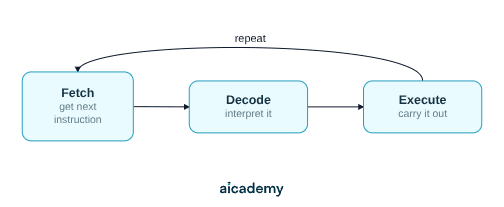
Every program running on any device is a sequence of machine code instructions loaded into RAM. The CPU's job is to repeat one process indefinitely:

  1. Fetch — retrieve the next instruction from memory
  2. Decode — interpret what that instruction means
  3. Execute — carry out the instruction

This loop is the fetch-decode-execute (FDE) cycle. It runs continuously from the moment a program starts.
The stored program concept means there is no architectural difference between code and data — both are binary numbers held in memory. This is why software can be updated without changing hardware.

CPU Components

The AQA 8525 spec requires understanding of these CPU components:

ComponentRole
ALU (Arithmetic Logic Unit)Performs arithmetic (add, subtract) and logic (AND, OR, NOT) operations
Control Unit (CU)Directs the fetch, decode, and execute stages; sends signals to all other components
ClockGenerates regular electrical pulses that synchronise every CPU operation; measured in GHz
RegistersUltra-fast storage locations inside the CPU holding single values needed immediately
BusesPathways carrying data (data bus), addresses (address bus), and control signals (control bus) between CPU and memory
Main memory (RAM)Holds the instructions and data currently in use; much slower than registers

Named registers — helpful context, not required by AQA 8525: Many textbooks and teachers refer to specific registers by name. These are not assessed by name in AQA 8525, but knowing them helps follow the FDE cycle description:

RegisterNameRole
PCProgram CounterHolds the address of the next instruction
MARMemory Address RegisterHolds the address being read from or written to
MDRMemory Data RegisterTemporarily holds data travelling to or from memory
CIRCurrent Instruction RegisterHolds the instruction being decoded and executed
ACCAccumulatorHolds the result of the most recent ALU operation

AQA 8525 requires you to know what a register is (fast, temporary CPU storage) and what the ALU, control unit, clock, and buses do — not to recall the names PC, MAR, MDR, CIR, or ACC from memory.

The Fetch Stage

The fetch stage retrieves the next instruction from RAM and loads it into the CPU ready for decoding.

Step-by-step:

StepWhat happens
1The address in the PC is copied to the MAR
2The MAR address is placed on the address bus; RAM is signalled to read
3The contents of that memory location travel along the data bus into the MDR
4The instruction is copied from the MDR into the CIR
5The PC is incremented by 1 — it now points to the next instruction

The PC increment happens during fetch, not after execute. This means by the time the current instruction is being decoded, the PC is already pointing at the next one.

The address bus is one-directional (CPU → memory). The data bus is bidirectional — data can travel from memory to CPU (fetch/load) or from CPU to memory (store/write).

The Decode Stage

The Control Unit (CU) decodes the instruction held in the CIR to determine what operation is required and what data it applies to.

A machine code instruction has two parts:

PartNameMeaning
First bitsOpcodeIdentifies the operation (e.g. ADD, LOAD, STORE, JUMP)
Remaining bitsOperandThe data value or memory address the operation uses

Example — an 8-bit instruction 00100101:

  • Opcode 0010 → ADD
  • Operand 0101 → the value 5 (or address 5, depending on addressing mode)

The CU interprets the opcode and sends control signals to the correct components: instructing the ALU to add, activating the memory interface to fetch more data, or updating the PC for a jump instruction.

No data travels between the CPU and RAM during the decode stage. Decode is entirely internal to the CPU.

Want more lessons like this one?

Generate lessons on anything you study. Free account, no card needed.

Start generating

The Execute Stage

The execute stage carries out the decoded instruction. The action taken depends entirely on the instruction type.

Instruction typeComponent usedWhat happens
Arithmetic (ADD, SUB)ALUCalculation performed; result stored in ACC
Logic (AND, OR, NOT)ALUBitwise operation performed; result stored in ACC
LoadMemory interfaceData fetched from RAM address (operand) into ACC
StoreMemory interfaceContents of ACC written to the RAM address in the operand
Jump (unconditional)CUPC is set to the address in the operand
Conditional jumpCUPC is updated only if a condition is met (e.g. ACC = 0)

After execute completes, the cycle immediately begins again — the PC already holds the address of the next instruction (incremented during fetch), so no delay occurs between cycles.

Factors Affecting CPU Performance

Three hardware factors directly control how quickly a CPU completes FDE cycles.

1. Clock speed — measured in GHz. The clock synchronises all CPU operations; each tick of the clock drives one step forward in the cycle. A 4 GHz CPU completes up to 4 billion ticks per second. Increasing clock speed increases the number of FDE cycles completed per second.

2. Number of cores — a core is a complete, independent FDE processing unit. A quad-core CPU contains four cores, each capable of fetching, decoding, and executing simultaneously. Tasks that can be split across multiple cores (parallel workloads) benefit directly; single-threaded programs use only one core regardless.

3. Cache size — cache is ultra-fast memory built into the CPU chip, much faster than RAM. Recently used instructions and data are held in cache. A larger cache reduces cache misses (situations where the CPU must wait for a slow RAM fetch), keeping the FDE cycle running without stalls.

FactorEffect of increasingLimitation
Clock speedMore cycles per secondHeat generation; physical limits
CoresParallel executionSoftware must be written to use multiple threads
Cache sizeFewer slow RAM accessesExpensive to manufacture; diminishing returns

Common Exam Mistakes

1. Confusing MAR and MDR

MAR holds an address (where to look in memory). MDR holds data (what was retrieved). They always work in sequence — MAR is loaded first, then the MDR receives the result.

2. Saying the PC increments after the execute stage

The PC increments during the fetch stage — before decode or execute begins. This is a deliberate design choice: decoding and execution can proceed while the PC already points to the next instruction.

3. Attributing arithmetic to the decode stage

The ALU performs arithmetic during the execute stage. Decode only interprets the opcode — no calculation happens during decode.

4. Listing RAM speed or RAM size as a CPU performance factor

The AQA 8525 spec lists three CPU performance factors: clock speed, number of cores, and cache size. RAM affects overall system performance but is not one of the three specified CPU factors — using it as an answer will not score the mark.

5. Saying more cores always makes the CPU faster

Additional cores only improve performance for multi-threaded workloads. A single-threaded program runs on one core regardless of how many cores the CPU has. More cores do not increase the speed of a single sequential task.

Key terms

Fetch-decode-execute cycle
The loop the CPU repeats continuously: fetch the next instruction from memory, decode it, then execute it.
Stored program concept
Storing both data and instructions as binary in the same memory, so software can be updated without changing hardware.
CPU
The Central Processing Unit, which reads instructions one at a time and executes them sequentially.
ALU
The Arithmetic Logic Unit, which performs arithmetic operations such as add and subtract and logic operations such as AND, OR, and NOT.
Control unit
The CPU component that directs the fetch, decode, and execute stages and sends control signals to all other components.
Clock
The component that generates regular electrical pulses to synchronise every CPU operation, measured in GHz.
Register
An ultra-fast storage location inside the CPU that holds a single value needed immediately.
Bus
A pathway carrying data, addresses, or control signals between the CPU and memory.
Opcode
The part of a machine code instruction that identifies the operation, such as ADD, LOAD, STORE, or JUMP.
Operand
The part of a machine code instruction that gives the data value or memory address the operation uses.
Core
A complete, independent fetch-decode-execute processing unit; a quad-core CPU has four.
Cache
Ultra-fast memory built into the CPU chip that holds recently used instructions and data, reducing slow RAM fetches.

Frequently asked questions

Fetch, decode, then execute. Fetch retrieves the next instruction from memory, decode interprets what the instruction means, and execute carries it out. The CPU repeats this loop continuously from the moment a program starts.

Clock speed, number of cores, and cache size. Higher clock speed means more cycles per second, more cores allow parallel execution of multi-threaded workloads, and a larger cache reduces slow RAM accesses. RAM size and speed are not on the spec's list of CPU factors.

No. Additional cores only improve performance for multi-threaded workloads that can be split across cores. A single-threaded program runs on just one core regardless of how many the CPU has, so more cores do not speed up a single sequential task.

Generate revision on any topic you study

Type any topic you're studying and Aicademy generates a complete lesson, quiz, and flashcard set, personalised to your level.

Lessons on anything

Structured, level-matched lessons on any topic you study

Practice quizzes

Find out what you actually know before the exam does

Flashcard sets

Lock in key concepts with instant revision cards

Ask Aica

Stuck on something? Get a clear explanation, any time

Prev

Programming Languages and Translators

Next

Primary and Secondary Storage

Top students don’t revise more. They revise what counts.

Start revising free

Free to start. No card needed.