Track progress, take quizzes and save notes on this lesson.

Free forever · no card needed

Start free
Foundational

Programming Languages and Translators

4.6.2 Classification of programming languages·4.6.3 Types of program translator

Aligned to the AQA 7517 specification

Level
Foundational
Reading time
7 min
Published
13 June 2026
Updated
1 July 2026
On this page
  1. 1.Classification of Programming Languages
  2. 2.Advantages and Disadvantages
  3. 3.Types of Program Translator
  4. 4.Compiler vs Interpreter: Side by Side
  5. 5.Summary: Translation Flow
  6. 6.Common Exam Mistakes

Key takeaways

  • Machine code is binary instructions the processor executes directly with no translation, and it is completely hardware-specific to one processor family.
  • Assembly language uses human-readable mnemonics with a one-to-one mapping to machine code instructions, and an assembler converts it to machine code.
  • A compiler translates an entire high-level program to machine code or bytecode before execution, so it runs faster and needs no source code present at runtime.
  • An interpreter translates and executes source code line by line at runtime, producing no output file and requiring the source code on the target machine.
  • Bytecode is an intermediate, hardware-independent representation that cannot run directly on the processor and is executed by a virtual machine such as the JVM.

Classification of Programming Languages

All programming languages sit on a spectrum from low-level (close to the hardware) to high-level (close to human language).

Low-level languages

Machine code

  • Binary instructions the processor executes directly
  • Every operation is a specific bit pattern: opcode + operand(s)
  • No translation required — the CPU runs it directly
  • Completely hardware-specific: code for one processor family will not run on another

Assembly language

  • Uses human-readable mnemonics instead of binary: LDA, ADD, STO, JMP
  • One mnemonic maps to exactly one machine code instruction (one-to-one)
  • Still hardware-specific: tied to a particular instruction set architecture

High-level languages

  • Closer to natural language and mathematical notation
  • Imperative high-level languages specify step-by-step what the computer must do (sequence, selection, iteration)
  • Machine-independent: the same source code can be compiled for different hardware
  • Examples: Python, Java, C++, JavaScript, Pascal

Advantages and Disadvantages

Low-levelHigh-level
Execution speedFast — directly controlled hardware operationsSlower — compiler/interpreter overhead; optimiser may bridge the gap
Hardware controlDirect — can access specific registers and memory addressesLimited — abstracted away by the language runtime
Program sizeSmall — no runtime or standard library overheadLarger — runtime libraries included
ReadabilityPoor — mnemonic codes and binary are hard to readGood — code resembles English / mathematics
WritabilityDifficult — programmer manages every detailEasy — built-in data types, functions, abstractions
PortabilityNone — code tied to specific hardwareHigh — recompile for a new platform
DebuggingHardEasier — compilers report line-level errors

When to use low-level: embedded firmware, device drivers, OS kernel code, time-critical inner loops where maximum performance and direct hardware access are needed.

Types of Program Translator

Source code is the human-readable program written by a developer. Before a computer can run it, it must be translated into object code (executable machine code). The program that does this translation is called a translator.

Assembler

Translates assembly language source code into machine code.

  • One-to-one translation: each mnemonic becomes exactly one machine instruction
  • Output: object code ready to execute

Compiler

Translates an entire high-level source program into machine code (or bytecode) before execution.

Steps:

  1. Lexical analysis — tokenises the source
  2. Syntax analysis — builds a parse tree; checks grammar
  3. Semantic analysis — checks type compatibility, scope
  4. Code generation — produces machine code or bytecode
  5. Optimisation — improves speed or reduces size

Key properties:

  • Translation happens once; the compiled program runs without the source code or compiler present
  • Faster execution than interpretation (no translation overhead at runtime)
  • Errors are reported as a complete list after the whole program is analysed
  • Object file is hardware-specific (unless producing bytecode)

Interpreter

Translates and executes the source code line by line at runtime.

Key properties:

  • No separate compilation step — run the source directly
  • Slower execution — each line is re-translated every time it is reached (e.g. inside a loop)
  • Easier to debug interactively — errors are reported immediately at the failing line
  • Source code must be present on the target machine
  • Useful for scripting, rapid development, and cross-platform environments

Bytecode

Some compilers (notably Java's javac) do not produce machine code directly. Instead they produce bytecode: an intermediate representation that is:

  • More compact than source code
  • Not tied to any specific hardware
  • Executed by a virtual machine (VM) at runtime (e.g. the Java Virtual Machine, JVM)

This gives a middle ground: compile once to bytecode; the VM interprets or JIT-compiles it on any platform.

Compiler vs Interpreter: Side by Side

CompilerInterpreter
Translation timeBefore execution (once)At execution (each run)
Execution speedFastSlow
Error reportingAll at once after compilationImmediately at each failing line
Source code at runtimeNot requiredRequired
Output fileExecutable object codeNo output file
Typical useProduction programsScripting, development, education

Something not quite clicking?

Ask Aica to explain any part of this differently. Free, takes 30 seconds.

Ask Aica

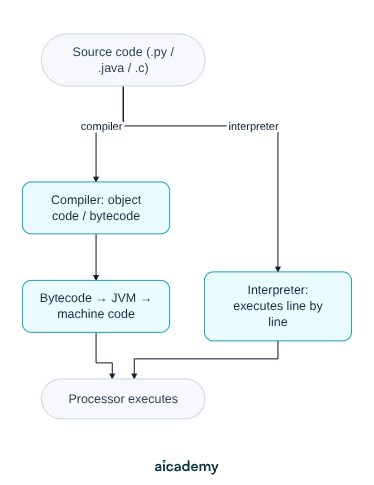
Summary: Translation Flow

Choosing a translator:

ScenarioBest choiceWhy
Final production softwareCompilerRuns faster; no source needed at runtime
Development / debuggingInterpreterImmediate feedback; test small changes
Cross-platform deploymentBytecode compiler + VMCompile once; run anywhere (JVM, CLR)
Embedded/assembly codeAssemblerDirect one-to-one translation to machine code

Source code vs object code: source code is written by developers and is human-readable. Object code (compiled machine code) is binary — understood by the processor, not by humans. A compiled program ships object code; an interpreted program ships source code (or bytecode).

Bytecode and the JVM: Java source (.java) → javac compiles to bytecode (.class) → the JVM interprets or JIT-compiles the bytecode at runtime. This is why Java programs run on any platform with a JVM installed, without recompilation.

Common Exam Mistakes

1. Claiming interpreters are "better" or "worse" than compilers

Neither is universally better. Compilers produce faster programs; interpreters enable easier debugging and development. The right choice depends on the context — production vs development, scripting vs systems programming.

2. Thinking an interpreter produces an executable file

Interpreters do not produce an output file. The source code is re-translated every time the program runs. Only compilers produce standalone executables.

3. Confusing bytecode with machine code

Bytecode is not machine code — it cannot be executed directly by the processor. It requires a virtual machine (JVM, CLR) to run it. Bytecode is an intermediate form between source code and machine code.

4. Stating assembly language is machine code

Assembly language uses human-readable mnemonics. Machine code is binary. They have a one-to-one correspondence, but they are distinct: an assembler is required to convert one to the other.

Key terms

Machine code
Binary instructions, each an opcode plus operand(s), that the processor executes directly with no translation and that are hardware-specific.
Assembly language
A low-level language using human-readable mnemonics that map one-to-one to machine code instructions and are tied to a particular instruction set.
High-level language
A machine-independent language close to natural language and mathematical notation, such as Python, Java or C++.
Source code
The human-readable program written by a developer before translation into object code.
Object code
The executable machine code produced by translating source code, understood by the processor but not by humans.
Translator
A program that translates source code into object code; assemblers, compilers and interpreters are translators.
Assembler
A translator that converts assembly language source code into machine code, one mnemonic becoming exactly one machine instruction.
Compiler
A translator that converts an entire high-level program into machine code or bytecode before execution, reporting errors as a complete list.
Interpreter
A translator that translates and executes source code line by line at runtime, reporting errors immediately at the failing line.
Bytecode
A compact, hardware-independent intermediate representation executed by a virtual machine rather than directly by the processor.
Virtual machine (VM)
Software such as the JVM that executes bytecode at runtime, interpreting or JIT-compiling it on any platform.

Frequently asked questions

A compiler translates the whole program to machine code or bytecode once before execution, runs faster, and needs no source at runtime. An interpreter translates and executes line by line at runtime, is slower, produces no output file, but is easier to debug as errors are reported immediately at the failing line.

No. Bytecode is an intermediate form between source code and machine code that cannot be executed directly by the processor. It requires a virtual machine such as the JVM or CLR to run it, which interprets or JIT-compiles it on any platform.

No. Assembly language uses human-readable mnemonics like LDA and ADD, while machine code is binary. They have a one-to-one correspondence, but they are distinct, and an assembler is required to convert assembly into machine code.

Generate revision on any topic you study

Type any topic you're studying and Aicademy generates a complete lesson, quiz, and flashcard set, personalised to your level.

Lessons on anything

Structured, level-matched lessons on any topic you study

Practice quizzes

Find out what you actually know before the exam does

Flashcard sets

Lock in key concepts with instant revision cards

Ask Aica

Stuck on something? Get a clear explanation, any time

Prev

Software, Operating Systems and System Software

Next

Logic Gates and Circuits

Related lessons

Top students don’t revise more. They revise what counts.

Start revising free

Free to start. No card needed.