Interrupts and Processor Performance

Aligned to the AQA 7517 specification
- Level
- Intermediate
- Reading time
- 7 min
- Published
- 13 June 2026
- Updated
- 16 August 2026
On this page
Key takeaways
- An interrupt is a signal requesting the processor's immediate attention; interrupts let the CPU respond to unpredictable events without polling, freeing it to run other code between events.
- Interrupts are checked at the end of each FDE cycle after the current instruction has fully executed, not during the Execute stage.
- When an interrupt is recognised the processor saves the volatile environment (PC, registers, status flags) to a stack, loads the ISR address into the PC, runs the ISR, then restores the saved state to resume exactly where it left off.
- More cores improve performance only for parallelisable workloads; a single-threaded program runs on one core and gains no benefit from additional cores.
- An n-bit address bus can address 2ⁿ locations, so a 32-bit address bus limits addressable RAM to 4 GiB regardless of how much is physically installed.
Effect on the Fetch-Execute Cycle
Interrupts are checked at the end of each FDE cycle, after the current instruction has fully executed.
Interrupt handling steps:
- Check the interrupt flag (status register) at the end of Execute
- If flag is set (interrupt pending): a. Save the current processor state — the volatile environment (PC, registers, status register flags) — to a stack in memory b. Load the ISR address into PC (redirect execution to the interrupt handler)
- Execute the ISR (the next FDE cycles run ISR instructions)
- At the end of the ISR: restore the saved state from the stack (PC, registers) — execution resumes from exactly where it was interrupted
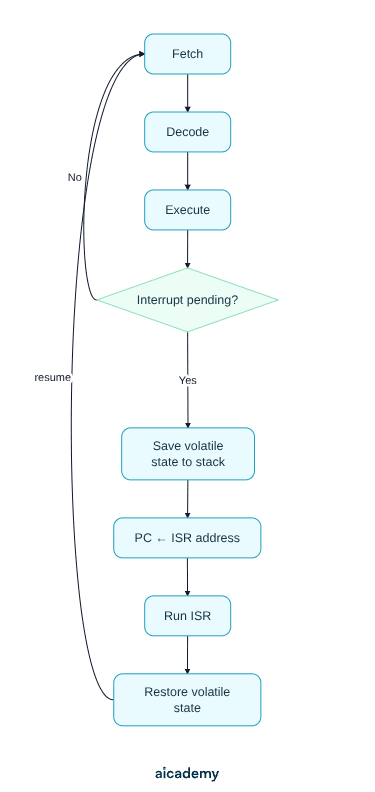
Why save the volatile environment? The ISR uses registers and may change the status flags. Without saving and restoring the interrupted program's state, the program would continue with corrupted register values after the ISR returns.
Worth saving these ideas?
Turn what you've read into instant revision cards. Free to get started.
Key terms
- Interrupt
- A signal sent to the processor that requests its immediate attention, interrupting the current flow of execution to handle a higher-priority event.
- ISR (Interrupt Service Routine)
- The handler code, a function in the OS kernel, that runs in response to a specific interrupt; each interrupt type has its own ISR.
- Volatile environment
- The current processor state (PC, registers, status register flags) saved to a stack when an interrupt is handled so execution can later resume.
- Clock speed
- The rate, measured in Hz, at which the processor performs FDE cycles; higher clock speed means more cycles per second and faster instruction execution.
- Core
- A complete FDE unit (ALU, CU, and registers); a multi-core processor has multiple cores that can execute different threads in parallel.
- Cache memory
- A small, very fast memory bank between the CPU and main RAM, organised in levels (L1, L2, L3), that exploits locality of reference to avoid slow main-memory access.
- Locality of reference
- The tendency of programs to reuse the same instructions and nearby data repeatedly, which makes cache memory effective.
- Word length
- The number of bits a processor handles as one unit; a 64-bit processor operates on 64-bit values in one instruction.
- Address bus width
- The number of bits in the address bus, which determines the maximum addressable memory as 2ⁿ locations for an n-bit bus.
- Data bus width
- The number of bits transferred per memory access; a wider data bus reduces the number of memory access cycles needed.
Frequently asked questions
Interrupts are checked at the end of each FDE cycle, after the current instruction has fully executed, not during the Execute stage. The current instruction always runs to completion before any interrupt is acknowledged.
The ISR uses registers and may change the status flags, so the interrupted program's state (PC, registers, status register flags) is saved to a stack and restored afterwards. Without this, the program would continue with corrupted register values after the ISR returns.
No. More cores improve performance only for parallelisable workloads. A single-threaded program runs on just one core, so additional cores provide no benefit for that program.
Generate revision on any topic you study
Type any topic you're studying and Aicademy generates a complete lesson, quiz, and flashcard set, personalised to your level.
Lessons on anything
Structured, level-matched lessons on any topic you study
Practice quizzes
Find out what you actually know before the exam does
Flashcard sets
Lock in key concepts with instant revision cards
Ask Aica
Stuck on something? Get a clear explanation, any time
Assembly Language
Hardware Devices: I/O and Secondary Storage
Related lessons
6 min
Processor Components and the Fetch-Execute Cycle
A-Level Computer Science · AQA 7517
4 months ago
6 min
CPU Architecture and the Stored Program Concept
A-Level Computer Science · AQA 7517
4 months ago
6 min