Track progress, take quizzes and save notes on this lesson.

Free forever · no card needed

Start free
Intermediate

Sorting Algorithms

2.1.3 Searching and sorting algorithms

Aligned to the OCR J277 specification

Level
Intermediate
Reading time
9 min
Published
11 June 2026
Updated
1 July 2026
On this page
  1. 1.Three Sorting Algorithms
  2. 2.Bubble Sort — How It Works
  3. 3.Bubble Sort — Worked Example
  4. 4.Insertion Sort — How It Works
  5. 5.Insertion Sort — Worked Example
  6. 6.Merge Sort — How It Works
  7. 7.Comparing the Three Sorting Algorithms
  8. 8.Common Exam Mistakes

Key takeaways

  • Bubble sort repeatedly compares and swaps adjacent pairs; after each pass the largest unsorted element is in its final position, and the algorithm can stop early if a pass produces no swaps.
  • Insertion sort builds a sorted section from the left by taking each new element and inserting it into the correct position; it is efficient when the list is already nearly sorted.
  • Merge sort uses divide and conquer - it splits the list in half until every sub-list has one element, then merges pairs back in order; it is efficient on large lists but requires extra memory for temporary sub-lists.
  • A common mistake when merging is to concatenate the two sub-lists; instead, always compare the front elements of each sub-list and take the smaller one.

Three Sorting Algorithms

OCR J277 requires knowledge of three sorting algorithms: bubble sort, insertion sort, and merge sort. You must be able to apply each to a data set, recognise them from a description or pseudocode, and understand their pre-requisites and behaviour.

You are not required to write or memorise the code for these algorithms. Focus on understanding the steps and being able to hand-trace them on a given list.

AlgorithmMethodTypical performance
Bubble sortRepeatedly swap adjacent elements that are in the wrong orderSlow on large lists; simple to understand
Insertion sortBuild a sorted section by inserting each new element in its correct positionEfficient on nearly-sorted lists
Merge sortDivide into halves, sort each half, merge back togetherEfficient on large lists; always

(Extra context — Big O notation such as and describes how performance scales with input size. It is not required by OCR J277, but helps explain why merge sort is preferred for large data sets.)

Bubble Sort — How It Works

Bubble sort repeatedly compares adjacent pairs of elements and swaps them if they are in the wrong order. After each full pass through the list, the largest unsorted element has "bubbled" to its correct position at the end.

Steps for one complete sort (ascending order):

  1. Compare elements at index 0 and 1. If index 0 > index 1, swap them.
  2. Move to index 1 and 2. Compare and swap if needed.
  3. Continue to the end of the list. This completes one pass.
  4. After each pass, the last unsorted position is now correct — shorten the comparison range by 1.
  5. Repeat until a full pass completes with no swaps (the list is sorted).

The algorithm can terminate early if a pass produces no swaps — a sign the list is already in order.

(Extra context — OCR J277 does not require you to write or recall pseudocode for bubble sort; the steps and hand-traces are what are assessed.)

FOR pass = 1 TO len(list) - 1
    FOR i = 0 TO len(list) - pass - 1
        IF list[i] > list[i+1] THEN
            temp = list[i]
            list[i] = list[i+1]
            list[i+1] = temp
        END IF
    END FOR
END FOR

Bubble Sort — Worked Example

Sort [5, 3, 8, 1, 9, 2] into ascending order.

Pass 1 (compare positions 0–4):

ComparisonBeforeSwap?After
index 0,15, 3, 8, 1, 9, 2Yes (5>3)3, 5, 8, 1, 9, 2
index 1,23, 5, 8, 1, 9, 2No3, 5, 8, 1, 9, 2
index 2,33, 5, 8, 1, 9, 2Yes (8>1)3, 5, 1, 8, 9, 2
index 3,43, 5, 1, 8, 9, 2No3, 5, 1, 8, 9, 2
index 4,53, 5, 1, 8, 9, 2Yes (9>2)3, 5, 1, 8, 2, 9

After pass 1: [3, 5, 1, 8, 2, 9] — 9 is in its final position.

Pass 2 (compare positions 0–3): [3, 5, 1, 8, 2, 9] Comparisons: (3,5) no; (5,1) yes → [3,1,5,8,2,9]; (5,8) no; (8,2) yes → [3,1,5,2,8,9]

Pass 3: [3,1,5,2,8,9] → [1,3,2,5,8,9]

Pass 4: [1,3,2,5,8,9] → [1,2,3,5,8,9]

Pass 5: [1,2,3,5,8,9] — no swaps → sort complete.

Final: [1, 2, 3, 5, 8, 9]

Insertion Sort — How It Works

Insertion sort divides the list into a sorted section (initially just the first element) and an unsorted section. It takes each element from the unsorted section and inserts it into the correct position in the sorted section.

Steps:

  1. Start: sorted section = [first element]; unsorted section = rest of list.
  2. Take the first element from the unsorted section. Call it the key.
  3. Compare the key backwards through the sorted section.
  4. Shift each element that is greater than the key one position to the right.
  5. Insert the key into the gap created.
  6. Repeat from step 2 until the unsorted section is empty.

(Extra context — OCR J277 does not require you to write or recall pseudocode for insertion sort; the steps and hand-traces are what are assessed.)

FOR i = 1 TO len(list) - 1
    key = list[i]
    j = i - 1
    WHILE j >= 0 AND list[j] > key
        list[j+1] = list[j]
        j = j - 1
    END WHILE
    list[j+1] = key
END FOR

Insertion sort is efficient when the list is already nearly sorted, because few elements need to be shifted.

Something not quite clicking?

Ask Aica to explain any part of this differently. Free, takes 30 seconds.

Ask Aica

Insertion Sort — Worked Example

Sort [5, 3, 8, 1, 9, 2] into ascending order.

PassKeySorted section (before insert)Sorted section (after insert)
13[5][3, 5] — 3 < 5, shift 5 right
28[3, 5][3, 5, 8] — 8 > 5, insert after 5
31[3, 5, 8][1, 3, 5, 8] — 1 < all, shift all right
49[1, 3, 5, 8][1, 3, 5, 8, 9] — 9 > all, insert at end
52[1, 3, 5, 8, 9][1, 2, 3, 5, 8, 9] — 2 > 1, shift 3,5,8,9 right

Pass 3 in detail — key = 1, sorted = [3, 5, 8]:

  • Compare 1 to 8: 1 < 8, shift 8 right → [3, 5, _, 8]
  • Compare 1 to 5: 1 < 5, shift 5 right → [3, _, 5, 8]
  • Compare 1 to 3: 1 < 3, shift 3 right → [_, 3, 5, 8]
  • No more elements: insert 1 at index 0 → [1, 3, 5, 8]

Final: [1, 2, 3, 5, 8, 9]

Merge Sort — How It Works

Merge sort uses a divide and conquer strategy. It splits the list in half repeatedly until every sub-list contains only one element (which is trivially sorted), then merges pairs of sub-lists back together in the correct order.

Stage 1 — Divide: split the list in half until every sub-list has 1 element.

Stage 2 — Merge: merge pairs of sub-lists. When merging two sorted sub-lists, repeatedly pick the smaller of the two front elements.

Worked example — sort [5, 3, 8, 1, 9, 2]:

Divide stage:
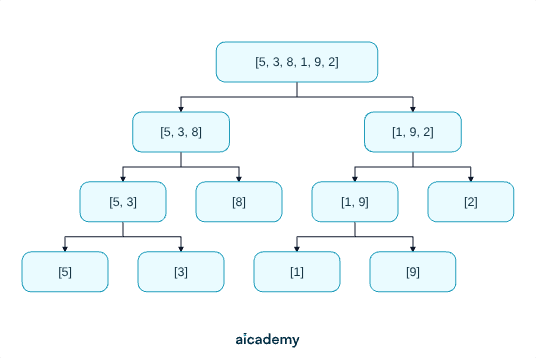
Every sub-list now has 1 element — each is sorted by definition.

Merge stage:

  • Merge [5] and [3]: compare 5 vs 3 → take 3; take remaining 5 → [3, 5]
  • [8] is already single → [8]
  • Merge [1] and [9]: compare 1 vs 9 → take 1; take 9 → [1, 9]
  • [2] is already single → [2]
  • Merge [3, 5] and [8]: take 3, take 5, take 8 → [3, 5, 8]
  • Merge [1, 9] and [2]: take 1, take 2, take 9 → [1, 2, 9]
  • Merge [3, 5, 8] and [1, 2, 9]:
    • Compare 3 vs 1 → take 1
    • Compare 3 vs 2 → take 2
    • Compare 3 vs 9 → take 3
    • Compare 5 vs 9 → take 5
    • Compare 8 vs 9 → take 8
    • Take remaining 9
    • [1, 2, 3, 5, 8, 9]

Comparing the Three Sorting Algorithms

FeatureBubble sortInsertion sortMerge sort
StrategySwap adjacent pairsInsert into sorted sectionDivide, then merge
Best caseOne pass (already sorted) — nearly sorted listAlways divides fully
Large unsorted listsSlowSlowEfficient
Nearly-sorted listsReasonable (early exit)Very efficientEfficient but may do more work
Complexity to implementSimpleModerateMore complex
Extra memory neededNoNoYes (temporary sub-lists)

Merge sort is generally preferred for large or unknown data sets because it performs consistently well. Insertion sort is preferred when the data is likely to be nearly sorted.

Common exam question: given pseudocode or a description, identify which sorting algorithm is being used. Key identifiers:

  • "Compare adjacent elements and swap" → bubble sort
  • "Insert each element into its correct position in a sorted section" → insertion sort
  • "Split into halves, sort each half, merge back" → merge sort

Common Exam Mistakes

1. Forgetting to show all passes in a bubble sort trace

Show every comparison in every pass, not just the swaps. Many marks are awarded for the intermediate states. Stop only when a full pass produces no swaps, or after n−1 passes.

2. Confusing the key with the wrong element in insertion sort

The key is always the first element of the unsorted section — the element being inserted. Shift elements from the sorted section to the right; do not move the key until its position is found.

3. Merging out of order in merge sort

When merging two sorted sub-lists, always compare the front elements of each sub-list and take the smaller one. Work through both sub-lists simultaneously — do not just concatenate them.

4. Identifying algorithms from descriptions

If you see this...The algorithm is...
"Repeatedly compare neighbours and swap if out of order"Bubble sort
"Take the next item and insert it into the correct position among those already sorted"Insertion sort
"Split in half, sort each half recursively, combine"Merge sort

Key terms

Bubble sort
A sorting algorithm that repeatedly compares and swaps adjacent elements in the wrong order; after each pass, the largest unsorted element moves to its final position.
Insertion sort
A sorting algorithm that maintains a sorted section and inserts each new element from the unsorted section into its correct position in the sorted section.
Merge sort
A divide-and-conquer sorting algorithm that splits a list into halves until each sub-list has one element, then merges pairs of sub-lists back together in order.
Pass
In bubble sort, one full iteration through the list comparing adjacent pairs; after each pass the largest unsorted element is in its correct place.
Key
In insertion sort, the element being taken from the unsorted section and inserted into its correct position in the sorted section.
Divide and conquer
A strategy that breaks a problem into smaller sub-problems, solves each, then combines the results; used by merge sort.
Sub-list
A smaller list produced during the divide stage of merge sort; sub-lists of size one are trivially sorted.

Frequently asked questions

Insertion sort is best for nearly sorted data because few elements need to be shifted, making it very efficient in that case. Bubble sort can also exit early if no swaps occur in a pass.

Look for key clues: swapping adjacent elements means bubble sort; inserting each element into a sorted section means insertion sort; splitting into halves and merging back means merge sort.

Merge sort creates temporary sub-lists during the divide and merge stages. These extra lists require additional memory, unlike bubble sort and insertion sort which sort in place without needing temporary storage.

Generate revision on any topic you study

Type any topic you're studying and Aicademy generates a complete lesson, quiz, and flashcard set, personalised to your level.

Lessons on anything

Structured, level-matched lessons on any topic you study

Practice quizzes

Find out what you actually know before the exam does

Flashcard sets

Lock in key concepts with instant revision cards

Ask Aica

Stuck on something? Get a clear explanation, any time

Prev

Searching Algorithms

Next

Programming Fundamentals

Related lessons

7 min

6 min

Lesson

Arrays and Records

OCR GCSE Computer Science · OCR J277

1 month ago

8 min

Lesson

Testing Programs

OCR GCSE Computer Science · OCR J277

1 month ago

Top students don’t revise more. They revise what counts.

Start revising free

Free to start. No card needed.