Track progress, take quizzes and save notes on this lesson.

Free forever · no card needed

Start free
Intermediate

Arrays and Records

2.2.3 Additional programming techniques

Aligned to the OCR J277 specification

Level
Intermediate
Reading time
6 min
Published
11 June 2026
Updated
1 July 2026
On this page
  1. 1.What Is an Array?
  2. 2.One-Dimensional Arrays — Indexing and Traversal
  3. 3.1D Array Worked Examples
  4. 4.Two-Dimensional Arrays — Rows and Columns
  5. 5.2D Arrays in Practice
  6. 6.Records — Grouping Related Data
  7. 7.Common Exam Mistakes

Key takeaways

  • An array is a fixed-length, ordered collection of elements of the same data type, accessed by index starting at 0 - its size cannot change at runtime.
  • A 2D array organises data in rows and columns; element at row r, column c is accessed as grid[r][c] - the first index is always the row.
  • A record groups related data of different data types under one named structure, unlike an array where all elements must be the same type.
  • When searching for a maximum value, always initialise the variable with the first element of the array (array[0]), not 0, to handle arrays containing negative values.

What Is an Array?

An array is a fixed-length, ordered collection of elements of the same data type, stored under a single variable name and accessed by index.

Arrays are the standard way to store a collection of related values — test scores for a class, temperatures for each day of the week, or pixel colours in an image.

scores = [72, 85, 91, 60, 78]   # 5-element integer array

Key properties of arrays:

PropertyDetail
Fixed lengthThe size is set when the array is created and does not change
Same data typeAll elements must be the same type (all integers, all strings, etc.)
Zero-indexedThe first element is at index 0
Random accessAny element can be read or written by its index in constant time

OCR J277 describes arrays as fixed-length or static structures — the array size is declared upfront and cannot grow or shrink at runtime.

One-Dimensional Arrays — Indexing and Traversal

A 1D array is a single row of elements. Access elements using their index (starting at 0).

days = ["Mon", "Tue", "Wed", "Thu", "Fri"]
#          0      1      2      3      4

days[0]        # "Mon"
days[2]        # "Wed"
days[4]        # "Fri"
days[2] = "Wednesday"   # update index 2 in place

Traversing a 1D array — visiting every element in order:

scores = [72, 85, 91, 60, 78]
for i in range(len(scores)):
    print("Student", i + 1, "scored", scores[i])

Output:

Student 1 scored 72
Student 2 scored 85
Student 3 scored 91
Student 4 scored 60
Student 5 scored 78

Finding the total and average:

total = 0
for i in range(len(scores)):
    total = total + scores[i]
average = total / len(scores)    # 77.2

1D Array Worked Examples

Worked example 1 — count how many scores are above 75:

scores = [72, 85, 91, 60, 78]
count = 0
for i in range(len(scores)):
    if scores[i] > 75:
        count = count + 1
print(count, "students scored above 75")   # 3 students

Verify manually: 85 > 75 ✓, 91 > 75 ✓, 78 > 75 ✓ → 3. Correct.

Worked example 2 — find the highest score:

highest = scores[0]          # assume first element is highest
for i in range(1, len(scores)):
    if scores[i] > highest:
        highest = scores[i]
print("Highest score:", highest)   # 91

Starting highest at scores[0] (not 0) ensures the result is correct even if all scores are negative.

Worked example 3 — reverse a 1D array into a new array:

original = [1, 2, 3, 4, 5]
reversed_arr = [0] * len(original)    # create array of same size
for i in range(len(original)):
    reversed_arr[i] = original[len(original) - 1 - i]
# reversed_arr = [5, 4, 3, 2, 1]

Two-Dimensional Arrays — Rows and Columns

A 2D array organises data in rows and columns — like a table or spreadsheet. It is an array of arrays.

grid = [
    [1, 2, 3],
    [4, 5, 6],
    [7, 8, 9]
]

Access element at row r, column c using grid[r][c]:

grid[0][0]    # 1  — row 0, column 0
grid[1][2]    # 6  — row 1, column 2
grid[2][1]    # 8  — row 2, column 1

OCR J277 states that 2D arrays can emulate database tables — each row represents a record, each column represents a field.

Example — a 2D array as a student table:

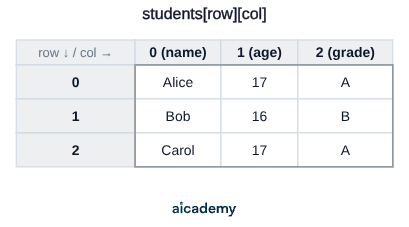
students = [
    ["Alice", 17, "A"],
    ["Bob",   16, "B"],
    ["Carol", 17, "A"]
]
# students[1][0] = "Bob"  (row 1, name column)
# students[0][2] = "A"    (row 0, grade column)

Reading students[row][col]: the first index picks the row, the second picks the column. The grid below shows the same data with its index labels.
Studying this for an exam?

Generate a personalised learning path for this subject. Free to get started.

Create a learning path

2D Arrays in Practice

Traversing a 2D array — visit every cell using nested loops:

grid = [[1, 2, 3], [4, 5, 6], [7, 8, 9]]

for row in range(3):
    for col in range(3):
        print(grid[row][col], end=" ")
    print()   # newline after each row

Output:

1 2 3
4 5 6
7 8 9

Worked example — print all student names from the 2D student table:

students = [["Alice", 17, "A"], ["Bob", 16, "B"], ["Carol", 17, "A"]]
for i in range(len(students)):
    print(students[i][0])   # column 0 = name

Output: Alice, Bob, Carol

Worked example — find all students with grade "A":

for i in range(len(students)):
    if students[i][2] == "A":   # column 2 = grade
        print(students[i][0], "achieved grade A")

Output: Alice achieved grade A, Carol achieved grade A

Records — Grouping Related Data

A record groups together related data items of different data types under a single named structure. Where an array stores many values of the same type, a record stores a single entity's attributes.

Structure of a record:

RECORD Student
    name : String
    age  : Integer
    grade: Character
END RECORD

Why records? An array of student names and a separate array of student ages are error-prone — deleting a name but not the matching age corrupts the data. A record keeps all fields for one student together.

Records in practice (Python uses dictionaries or classes for this, but the concept is the same):

student = {
    "name":  "Alice",
    "age":   17,
    "grade": "A"
}
print(student["name"])    # "Alice"
print(student["grade"])   # "A"

A key difference from a 2D array: record fields can hold different data types (name=String, age=Integer, grade=Character), whereas all elements of an array must be the same type.

Common Exam Mistakes

1. Confusing row and column indices in 2D arrays

grid[r][c] — the first index is the row, the second is the column. grid[2][0] is row 2, column 0 — not the other way round. Sketch the grid to confirm before answering.

2. Starting the highest-value search at 0

highest = 0 fails if all scores are negative (e.g. temperatures below zero). Always initialise with array[0] — the first element of the actual data.

3. Treating arrays as variable-length

OCR J277 defines arrays as fixed-length structures. You cannot append to an array at runtime — the size is set when it is created. (Python lists can grow, but in the context of this spec, treat arrays as fixed.)

4. Confusing arrays and records

An array stores multiple values of the same type. A record stores multiple fields of different types that describe one entity. Use an array for "all the scores"; use a record for "all details about one student".

MistakeCorrection
grid[col][row]grid[row][col] — row index first
highest = 0 before searching an arrayhighest = scores[0] — start from the first element
"I can add more items to the array later"Arrays are fixed-length; their size cannot change at runtime

Key terms

Array
A fixed-length, ordered collection of elements all of the same data type, stored under a single variable name and accessed by index.
Index
The position of an element in an array, starting at 0 for the first element.
1D array
A single row of elements accessed by one index (e.g. scores[2] for the third element).
2D array
An array of arrays organised into rows and columns, accessed by two indices: grid[row][col].
Traversal
Visiting every element in an array in order, typically using a loop that iterates from index 0 to the last index.
Record
A data structure that groups related fields of different data types together under one named structure to represent a single entity.
Field
One named attribute within a record, such as name (String) or age (Integer).
Fixed-length
A property of arrays meaning their size is declared at creation and cannot be increased or decreased while the program is running.
Random access
The ability to read or write any element of an array directly by its index in constant time, without stepping through other elements.

Frequently asked questions

An array stores multiple values of the same data type under one name, accessed by index. A record groups multiple fields of different data types (e.g. name as String, age as Integer) that all describe one entity.

Use nested loops - an outer loop for rows and an inner loop for columns. Access any element with grid[row][col], where the first index is the row and the second is the column. For example, grid[1][2] is row 1, column 2.

OCR J277 defines arrays as static structures whose size is set when created and cannot grow or shrink at runtime. Even though Python lists can grow, in exam answers you must treat arrays as fixed-length.

Generate revision on any topic you study

Type any topic you're studying and Aicademy generates a complete lesson, quiz, and flashcard set, personalised to your level.

Lessons on anything

Structured, level-matched lessons on any topic you study

Practice quizzes

Find out what you actually know before the exam does

Flashcard sets

Lock in key concepts with instant revision cards

Ask Aica

Stuck on something? Get a clear explanation, any time

Prev

String Manipulation and File Handling

Next

SQL Basics

Related lessons

7 min

7 min

9 min

Lesson

Sorting Algorithms

OCR GCSE Computer Science · OCR J277

1 month ago

Top students don’t revise more. They revise what counts.

Start revising free

Free to start. No card needed.