Track progress, take quizzes and save notes on this lesson.

Free forever · no card needed

Start free
Intermediate

Designing and Refining Algorithms

2.1.2 Designing, creating and refining algorithms

Aligned to the OCR J277 specification

Level
Intermediate
Reading time
8 min
Published
11 June 2026
Updated
1 July 2026
On this page
  1. 1.Inputs, Processes and Outputs
  2. 2.Pseudocode — Writing Algorithms in Plain Language
  3. 3.Flowcharts — Visualising Algorithm Flow
  4. 4.Trace Tables — Following an Algorithm Step by Step
  5. 5.Syntax Errors and Logic Errors
  6. 6.Nesting Selection and Iteration
  7. 7.Common Exam Mistakes

Key takeaways

  • Pseudocode is a language-independent way to write algorithms precisely enough to translate directly into code, using constructs like IF, FOR, and WHILE.
  • A trace table records the value of every variable after each step, letting you verify an algorithm's output and pinpoint exactly where it goes wrong.
  • A syntax error prevents a program from running; a logic error lets it run but produces incorrect output - the key test is whether the program executes at all.
  • Flowchart decision diamonds must be diamond-shaped and have exactly two labelled exits (YES/NO); using a rectangle for a decision loses marks even if the logic is correct.
  • In nested loops, the inner loop runs completely for each iteration of the outer loop, so track every variable separately in a trace table.

Inputs, Processes and Outputs

Before writing an algorithm, identify its inputs (data it receives), processes (operations it performs), and outputs (results it produces). This IPO model defines what the algorithm must do before any code is written.

Worked example — an algorithm that calculates the area of a rectangle:

ComponentDetail
InputsLength (number), Width (number)
ProcessMultiply length by width
OutputArea (number)

A structure diagram shows how a problem is decomposed into sub-problems as a hierarchy of boxes. Each box is a sub-task; lines show which sub-tasks belong to which parent task.
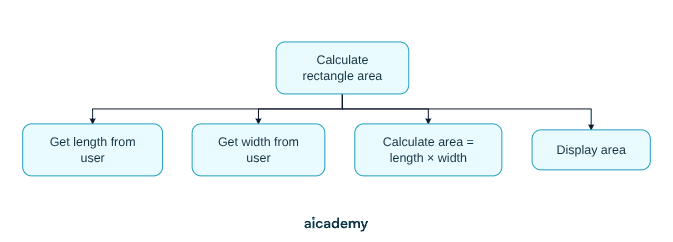
Producing this diagram before coding ensures every sub-task is accounted for. OCR exams may ask you to complete or extend a partially drawn structure diagram.

Pseudocode — Writing Algorithms in Plain Language

Pseudocode is a structured, language-independent way to write algorithms. It is not valid code in any specific language, but it is precise enough to translate directly into one.

Common pseudocode conventions used in OCR J277:

ConstructPseudocode example
Assignmentscore = 0
OutputOUTPUT "Enter a number: "
Inputx = INPUT()
SelectionIF x > 0 THEN ... ELSE ... END IF
Count-controlled loopFOR i = 1 TO 10 ... END FOR
Condition-controlled loopWHILE x != 0 ... END WHILE

Worked example — algorithm to find the largest of three numbers:

largest = a
IF b > largest THEN
    largest = b
END IF
IF c > largest THEN
    largest = c
END IF
OUTPUT "Largest is " + largest

Pseudocode is read and written in exams. Practise converting between pseudocode, flowcharts, and actual code so you can move fluently between all three.

Flowcharts — Visualising Algorithm Flow

A flowchart uses standard symbols to show the sequence, decisions, and loops in an algorithm. OCR J277 requires knowledge of these six symbols:

SymbolShape descriptionUsed for
TerminalRounded rectangle (oval/stadium)Start and End of the algorithm
ProcessRectangleAn action or calculation
Input / OutputParallelogramReading input or displaying output
DecisionDiamond (rhombus)A yes/no or true/false branch
Sub programRectangle with double vertical barsCalling a named sub-program
Line (flow)ArrowDirection of execution

Worked example — flowchart for "find the larger of two numbers A and B":
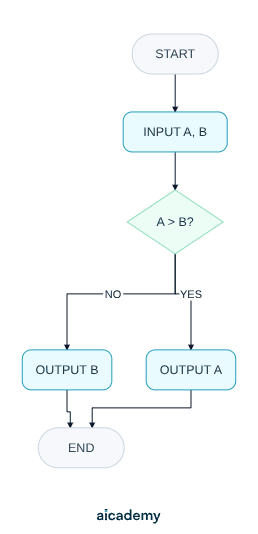
A decision diamond always has exactly two exit paths, labelled YES/NO or TRUE/FALSE. Every path through the flowchart must eventually reach the terminal.

Trace Tables — Following an Algorithm Step by Step

A trace table records the value of every variable after each step of an algorithm. Trace tables let you verify whether an algorithm produces correct output — and pinpoint exactly where it goes wrong if it does not.

Worked example — trace the algorithm below for input n = 5:

total = 0
i = 1
WHILE i <= n
    total = total + i
    i = i + 1
END WHILE
OUTPUT total
StepitotalNote
Start10Initial values
Loop 111total = 0+1; i checked: 1≤5
After inc21i = 1+1
Loop 223total = 1+2
After inc33
Loop 336total = 3+3
After inc46
Loop 4410total = 6+4
After inc510
Loop 5515total = 10+5
After inc615i = 5+1; now 6>5, loop ends
Output15

Output: 15 (which equals 1+2+3+4+5). The algorithm correctly sums integers from 1 to n.

How much of this have you taken in?

Quiz yourself on this section, free, no card needed.

Test myself

Syntax Errors and Logic Errors

Two categories of error arise when algorithms are written as programs:

Error typeWhat it isEffect on the program
Syntax errorBreaks the grammatical rules of the programming languageThe program cannot be run or translated
Logic errorThe program runs but produces incorrect or unexpected outputThe program runs but gives wrong results

Syntax error example — missing THEN keyword:

IF score > 10   ← missing THEN
    OUTPUT "Pass"
END IF

The translator cannot parse this. It will report an error before the program runs.

Logic error example — wrong comparison operator:

IF score > 10 THEN    ← should be >= 10 for "pass at 10"
    OUTPUT "Pass"
ELSE
    OUTPUT "Fail"
END IF

A student with score exactly 10 would incorrectly be told "Fail". The program runs without errors but produces wrong output for boundary inputs.

Syntax errors are caught before the program runs. Logic errors only reveal themselves when you test with carefully chosen data.

Nesting Selection and Iteration

Nesting means placing one structure inside another — an IF inside another IF, or a loop inside another loop. OCR J277 requires you to read, write, and trace nested structures.

Nested selection — award a grade based on score and bonus flag:

IF score >= 70 THEN
    IF bonus == TRUE THEN
        grade = "A*"
    ELSE
        grade = "A"
    END IF
ELSE
    IF score >= 50 THEN
        grade = "B"
    ELSE
        grade = "C"
    END IF
END IF

Nested iteration — print a multiplication table:

FOR row = 1 TO 5
    FOR col = 1 TO 5
        OUTPUT row * col
    END FOR
END FOR

The inner loop runs completely for each iteration of the outer loop. For a 5×5 table, the inner loop body executes 25 times in total.

In a trace table, track every variable — inner loop counter, outer loop counter, and any accumulator — separately. Missing a variable is the most common trace-table error.

Common Exam Mistakes

1. Drawing flowchart decisions as rectangles

Decision diamonds must be diamond-shaped and have exactly two labelled exits (YES/NO). Using a rectangle for a decision loses marks even if the logic is correct.

2. Completing a trace table top to bottom without updating correctly

Update variables at the moment the line executes, not at the end of the loop. After i = i + 1, record the new value of i on the same row before moving on.

3. Confusing syntax and logic errors

If a program will not run, the error is a syntax error. If it runs but gives wrong output, the error is a logic error. Exam questions often ask you to classify an error — the key test is whether the program executes at all.

4. Using vague process boxes in flowcharts

A process box should contain a specific action: area = length * width, not "calculate area". The more precise the box, the closer the flowchart is to actual code.

MistakeCorrection
Diamond has three exitsDecision must have exactly two paths (YES/NO)
Trace table skips intermediate valuesRecord every variable change as it happens
"It runs but gives wrong answer" classified as syntax errorThat is a logic error — syntax errors prevent execution

Key terms

Algorithm
A precise, finite, unambiguous sequence of steps that solves a problem and produces the correct output for all valid inputs.
Pseudocode
A structured, language-independent notation for writing algorithms, precise enough to translate into code but not tied to any specific programming language.
Flowchart
A diagram that uses standard symbols (terminal, process, decision, etc.) to show the sequence, decisions, and loops in an algorithm.
Trace table
A table that records the value of every variable after each step of an algorithm, used to verify correctness or find where it produces wrong output.
Syntax error
An error that breaks the grammatical rules of a programming language, preventing the program from being run or translated.
Logic error
An error where the program runs without crashing but produces incorrect or unexpected output due to a flaw in the algorithm's logic.
Structure diagram
A hierarchy of boxes showing how a problem is decomposed into sub-tasks, with lines connecting each sub-task to its parent.
Nesting
Placing one programming construct inside another, such as an IF inside another IF or a loop inside a loop.
IPO model
A planning framework that identifies an algorithm's Inputs, Processes, and Outputs before any code is written.

Frequently asked questions

A syntax error breaks the grammar rules of the language so the program cannot run at all. A logic error lets the program run but produces incorrect or unexpected output, such as using the wrong comparison operator at a boundary value.

OCR J277 requires six symbols: a rounded rectangle (terminal) for Start/End, a rectangle (process) for actions, a parallelogram for input/output, a diamond (decision) for yes/no branches, a rectangle with double bars for sub-programs, and arrows for flow direction.

Record every variable's value at the exact moment each line executes, not at the end of a loop. Track each variable - including inner and outer loop counters - in its own column and update it row by row as the algorithm runs.

Generate revision on any topic you study

Type any topic you're studying and Aicademy generates a complete lesson, quiz, and flashcard set, personalised to your level.

Lessons on anything

Structured, level-matched lessons on any topic you study

Practice quizzes

Find out what you actually know before the exam does

Flashcard sets

Lock in key concepts with instant revision cards

Ask Aica

Stuck on something? Get a clear explanation, any time

Prev

Computational Thinking

Next

Searching Algorithms

Related lessons

8 min

7 min

9 min

Lesson

Sorting Algorithms

OCR GCSE Computer Science · OCR J277

1 month ago

8 min

Lesson

Testing Programs

OCR GCSE Computer Science · OCR J277

1 month ago

Top students don’t revise more. They revise what counts.

Start revising free

Free to start. No card needed.