Track progress, take quizzes and save notes on this lesson.

Free forever · no card needed

Start free
Intermediate

Representing Sound: Sampling Rate and Bit Depth

3.3.7 Representing sound

Aligned to the AQA 8525 specification

Level
Intermediate
Reading time
7 min
Published
3 June 2026
Updated
1 July 2026
On this page
  1. 1.Analogue and Digital Sound
  2. 2.Sampling: Capturing Sound as Data
  3. 3.Sampling Rate
  4. 4.Sample Resolution
  5. 5.Calculating Sound File Size
  6. 6.Quality vs File Size Trade-offs
  7. 7.Common Exam Mistakes

Key takeaways

  • Sound is a continuous analogue pressure wave, but computers can only store discrete digital values, so the signal must be converted by analogue-to-digital conversion.
  • Sampling rate is the number of samples taken per second, measured in hertz; a higher rate captures more of the wave's shape and gives a more accurate recording.
  • Sample resolution (bit depth) is the number of bits used per sample; the number of distinct amplitude levels is 2 to the power of the sample resolution, so 16 bits gives 65,536 levels.
  • Uncompressed sound file size in bits = sampling rate × sample resolution × duration in seconds; divide by 8 to convert the answer to bytes.
  • Sampling rate and sample resolution are independent: a recording can have a high sampling rate but low resolution, and both must be adequate for high-quality audio.

Analogue and Digital Sound

Sound is a continuous pressure wave — a vibration that travels through air (or another medium) and arrives at the ear as smoothly varying changes in air pressure. This is an analogue signal: it can take any value within a range, and it changes continuously with no gaps.

Computers can only store and process digital data — discrete binary values with no in-between states. To store sound on a computer, the continuous analogue signal must be converted into a sequence of discrete binary numbers. This conversion process is called analogue-to-digital conversion.

PropertyAnalogue soundDigital sound
ValuesContinuous — any valueDiscrete — fixed steps
StorageCannot be stored directlyStored as binary numbers
Quality lossNone in transmissionDepends on sampling settings

The higher the quality of the digital representation, the more closely it approximates the original analogue wave — and the more storage it requires.

Sampling: Capturing Sound as Data

Sampling is the process of measuring the amplitude (loudness) of a sound wave at regular intervals and recording each measurement as a binary number.

Each individual measurement is called a sample. The sequence of samples forms a digital approximation of the original wave.
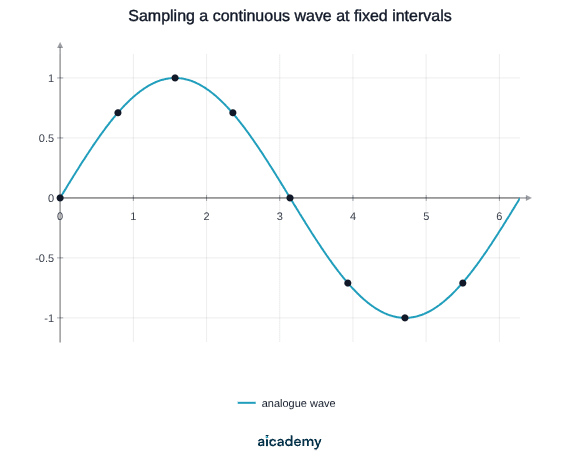
The smooth curve is the original analogue wave. Each marked point is a sample — a measurement of the wave's amplitude taken at a fixed moment. The digital recording stores only those sampled values.

The accuracy of the digital representation depends on two factors:

  1. How often samples are taken — the sampling rate
  2. How precisely each sample is recorded — the sample resolution

A digital recording that uses many samples per second, each stored with many bits, closely matches the original wave. Fewer or less precise samples produce an approximation that loses detail.

Sampling Rate

Sampling rate is the number of samples taken per second. It is measured in hertz (Hz) or kilohertz (kHz).

A higher sampling rate captures more of the original wave's shape per second, producing a more accurate digital recording.

Sampling rateTypical use
8,000 HzTelephone voice calls
22,050 HzLow-quality audio
44,100 HzCD-quality audio
96,000 HzProfessional studio recording

Effect on quality and file size: doubling the sampling rate doubles both the accuracy of the recording and the amount of data generated per second. A 44,100 Hz recording captures 44,100 measurements every second — more than five times as many as an 8,000 Hz telephone recording.

(Extra context — not required by AQA 8525) Sampling rate must be at least twice the highest frequency present to avoid distortion. Human hearing reaches approximately 20,000 Hz, which is why CD audio uses 44,100 Hz.

Sample Resolution

Sample resolution (also called bit depth) is the number of bits used to store each individual sample. It determines how precisely the amplitude of the wave can be recorded.

More bits per sample means more possible amplitude values, producing a more accurate representation of volume changes.

The number of distinct amplitude levels is :

Sample resolutionAmplitude levelsTypical use
8 bits256Low-quality audio, voice
16 bits65,536CD-quality audio
24 bits16,777,216Professional studio recording

Worked example — how many amplitude levels does 16-bit audio provide?

With 8-bit resolution, only 256 levels are available. Quiet passages that fall between two of those 256 steps are rounded to the nearest level, producing a faint background hiss called quantisation noise. Higher bit depth makes those steps smaller and the noise imperceptible.

Studying this for an exam?

Generate a personalised learning path for this subject. Free to get started.

Create a learning path

Calculating Sound File Size

The uncompressed file size of a digital audio recording depends on three values: sampling rate, sample resolution, and duration.

Worked example — a 10-second recording at 8,000 Hz with 8-bit resolution:

Worked example — 60 seconds of CD-quality mono audio (44,100 Hz, 16-bit):

The formula gives the uncompressed file size. Audio formats such as MP3 apply compression to reduce this significantly, but the uncompressed value is what AQA 8525 expects you to calculate.

Quality vs File Size Trade-offs

Increasing either sampling rate or sample resolution improves audio quality but increases file size proportionally.

ChangeEffect on file sizeEffect on quality
Double the sampling rate× 2More faithful wave shape
Halve the sampling rate÷ 2Loss of high frequencies
Double the sample resolution× 2More precise volume levels
Halve the sample resolution÷ 2Audible quantisation noise

Worked example — compare two 30-second mono recordings:

VersionSampling rateSample resolutionFile size
A8,000 Hz8-bit
B44,100 Hz16-bit

Version B produces audio roughly 11 times larger than Version A. Whether that quality difference matters depends on the application — a voice call can tolerate Version A quality; a music recording cannot.

Common Exam Mistakes

1. Confusing sampling rate with sample resolution

Sampling rate is how often samples are taken (Hz). Sample resolution is how many bits each sample uses. They are independent — a recording can have a high sampling rate but low resolution, or vice versa.

2. Forgetting to divide by 8

The formula produces an answer in bits. Divide by 8 to convert to bytes. The mark is usually awarded for the byte value, not the bit value, unless the question specifies otherwise.

3. Using the wrong unit for sampling rate

Sampling rate is measured in Hz (samples per second). A rate of 44.1 kHz is 44,100 Hz — not 44,100 kHz. Check that you are substituting the correct number into the formula.

4. Saying higher sampling rate always produces better quality

A higher sampling rate captures the wave shape more accurately, but if the sample resolution is very low, the amplitude at each sample point is still poorly recorded. Both values must be adequate for high-quality audio.

5. Multiplying by 2 for stereo without being asked

Stereo audio has two channels and therefore doubles the file size. Only apply the × 2 factor if the question explicitly states the recording is stereo.

Key terms

Analogue signal
A signal that varies continuously and can take any value within a range, such as a sound pressure wave.
Analogue-to-digital conversion
The process of converting a continuous analogue signal into a sequence of discrete binary numbers that a computer can store.
Sampling
Measuring the amplitude of a sound wave at regular intervals and recording each measurement as a binary number.
Sample
An individual measurement of a sound wave's amplitude taken at a fixed moment in time.
Sampling rate
The number of samples taken per second, measured in hertz (Hz) or kilohertz (kHz).
Sample resolution
Also called bit depth, the number of bits used to store each individual sample, determining how precisely amplitude is recorded.
Quantisation noise
A faint background hiss caused when amplitudes that fall between available levels are rounded to the nearest level at low bit depth.

Frequently asked questions

Sampling rate is how often samples are taken, measured in hertz (samples per second). Sample resolution, or bit depth, is how many bits are used to store each sample. They are independent, and both must be high enough for good quality audio.

File size in bits = sampling rate × sample resolution × duration in seconds. Divide by 8 to convert to bytes. For example, 10 seconds at 8,000 Hz and 8-bit resolution gives (8,000 × 8 × 10) ÷ 8 = 80,000 bytes.

A higher sampling rate captures the wave shape more accurately, but if the sample resolution is very low the amplitude at each sample point is still recorded poorly. Both the sampling rate and the sample resolution must be adequate for high-quality audio.

Generate revision on any topic you study

Type any topic you're studying and Aicademy generates a complete lesson, quiz, and flashcard set, personalised to your level.

Lessons on anything

Structured, level-matched lessons on any topic you study

Practice quizzes

Find out what you actually know before the exam does

Flashcard sets

Lock in key concepts with instant revision cards

Ask Aica

Stuck on something? Get a clear explanation, any time

Prev

Image Representation: Pixels and Colour Depth

Next

Data Compression: RLE and Huffman Coding

Related lessons

Top students don’t revise more. They revise what counts.

Start revising free

Free to start. No card needed.