Image Representation: Pixels and Colour Depth

Aligned to the AQA 8525 specification
- Level
- Intermediate
- Reading time
- 7 min
- Published
- 3 June 2026
- Updated
- 16 August 2026
On this page
Key takeaways
- A bitmap image is a rectangular grid of pixels, and each pixel stores a single colour value as a binary number.
- Colour depth is the number of bits used per pixel, and the number of possible colours is 2 to the power of the colour depth, so 8-bit depth gives 256 colours.
- Uncompressed file size in bits equals width times height times colour depth; divide by 8 to convert the answer to bytes.
- A pixel has no fixed physical size: the same 800 x 600 image looks sharp on a postcard but blocky on a billboard, even though the pixel count never changes.
- Both resolution and colour depth affect file size; doubling either one doubles the size, and a high-resolution image with low colour depth can still look worse than the reverse.
Worth saving these ideas?
Turn what you've read into instant revision cards. Free to get started.
Reading a Bitmap from Binary
A black-and-white bitmap (1 bit per pixel) can be read directly from its binary data. Each bit maps to one pixel: 0 = white, 1 = black.
Worked example — decode this 4 × 4 bitmap:
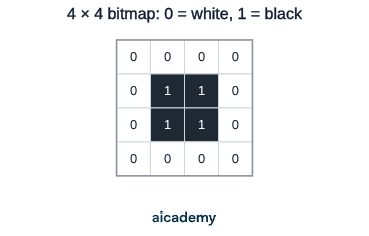
| Row | Binary | Pixels (W = white, B = black) |
|---|---|---|
| 1 | 0000 | W W W W |
| 2 | 0110 | W B B W |
| 3 | 0110 | W B B W |
| 4 | 0000 | W W W W |
The pattern forms a 2 × 2 black square in the centre of an all-white frame.
Encoding works in reverse: given a pixel grid, write 0 for each white pixel and 1 for each black pixel, reading left to right across each row.
Key terms
- Pixel
- A single point in a digital image that stores one colour value.
- Bitmap
- An image stored as a rectangular grid of pixel colour values.
- Image dimensions
- The width and height of the pixel grid, measured in pixels.
- Colour depth
- The number of bits used to represent each pixel's colour.
- Total pixel count
- Width multiplied by height, giving the number of individual colour values stored.
- Resolution
- The width and height of an image in pixels, determining how much spatial detail it can capture.
Frequently asked questions
Multiply width by height by colour depth to get the size in bits, then divide by 8 to convert to bytes. For example, a 200 x 300 image at 8-bit colour depth is (200 x 300 x 8) / 8 = 60,000 bytes. This formula gives the uncompressed size.
Colour depth is the number of bits used to represent each pixel, measured in bits. The number of possible colours is 2 to the power of the colour depth, so a colour depth of 8 bits gives 256 colours, not 8 colours.
No. A high-resolution image with a low colour depth can look worse than a lower-resolution image with a high colour depth, because resolution and colour depth are independent dimensions of quality and both matter.
Generate revision on any topic you study
Type any topic you're studying and Aicademy generates a complete lesson, quiz, and flashcard set, personalised to your level.
Lessons on anything
Structured, level-matched lessons on any topic you study
Practice quizzes
Find out what you actually know before the exam does
Flashcard sets
Lock in key concepts with instant revision cards
Ask Aica
Stuck on something? Get a clear explanation, any time
ASCII and Unicode: Character Encoding
Representing Sound: Sampling Rate and Bit Depth
Related lessons
6 min
6 min