TCP/IP and Application Layer Protocols

Aligned to the AQA 7517 specification
- Level
- Intermediate
- Reading time
- 6 min
- Published
- 13 June 2026
- Updated
- 16 August 2026
On this page
Key takeaways
- TCP/IP has four layers: Application, Transport, Network/Internet and Link; each layer encapsulates the data from the layer above by adding its own header, which the receiver strips off.
- A socket is a connection endpoint identified by an IP address + port number pair; well-known ports are 0–1023, while client (ephemeral) ports 1024–65535 are assigned dynamically per outgoing connection.
- MAC addresses are hardware addresses used for local delivery within a LAN at the Link layer, while IP addresses are logical addresses used for routing between networks at the Network layer.
- SMTP sends email as a push protocol (port 25) while POP3 retrieves it to a client (port 110); a client downloading new email therefore uses POP3, not SMTP.
- HTTP (port 80) is stateless so each request is independent; HTTPS (port 443) runs HTTP over TLS, encrypting all traffic and using digital certificates to verify the server's identity.
Worth saving these ideas?
Turn what you've read into instant revision cards. Free to get started.
Web Servers and Email Servers
Web server
- Stores web pages and resources (HTML, images, CSS, JavaScript)
- Listens on port 80 (HTTP) or 443 (HTTPS)
- On receiving an HTTP GET request: locates the resource and responds with its content
- Returns status codes:
200 OK,404 Not Found,301 Redirect,500 Internal Server Error
Email server
- Manages the sending and receiving of email
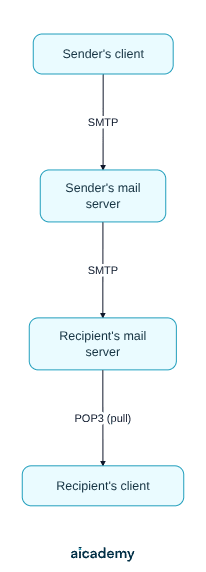
- Uses SMTP to send outbound mail (client → server; server → server)
- Uses POP3 (or IMAP) for clients to retrieve mail from the server
- Stores mailboxes for each user until mail is retrieved
Full email flow:
Key terms
- TCP/IP
- The protocol suite underpinning all Internet communication, organised into four layers: Application, Transport, Network/Internet and Link.
- Encapsulation
- The process by which each TCP/IP layer adds its own header to the data from the layer above, with the receiver stripping each header in turn.
- Port
- A number that identifies a specific service or application on a host; combined with an IP address it identifies a connection endpoint.
- Socket
- The endpoint of a connection, identified by an IP address + port number pair, with one socket on each of the client and server.
- Well-known port
- A reserved port number in the range 0–1023 assigned to standard services such as HTTP (80) and HTTPS (443).
- MAC address
- The hardware address of a network interface card, used for local delivery within a single network segment at the Link layer.
- FTP
- File Transfer Protocol: transfers files between client and server over separate control (port 21) and data (port 20) connections, unencrypted.
- HTTP
- HyperText Transfer Protocol (port 80): a stateless protocol that transfers web pages from a web server to a browser.
- HTTPS
- HTTP Secure (port 443): HTTP over TLS, encrypting all traffic and using digital certificates to verify the server's identity.
- SMTP
- Simple Mail Transfer Protocol (port 25): a push protocol used to send email from a client to a mail server and between mail servers.
- POP3
- Post Office Protocol 3 (port 110): retrieves email from a mail server to a client, typically deleting it from the server.
- SSH
- Secure Shell (port 22): provides encrypted remote login and command execution, replacing the insecure Telnet.
Frequently asked questions
SMTP sends email outbound as a push protocol on port 25, from a client to a mail server and between mail servers. POP3 retrieves email inbound on port 110, downloading it to the client and typically deleting it from the server. A client downloading new email uses POP3.
A MAC address is a hardware address used for local delivery within a single LAN at the Link layer. An IP address is a logical address used for routing across networks at the Network layer. As a packet hops between networks the MAC addresses change but the IP addresses stay the same end-to-end.
HTTP is stateless: each request is independent and the server retains no memory of previous requests. Websites that appear to track sessions, such as logged-in users, use cookies or session tokens layered on top of HTTP to simulate state.
Generate revision on any topic you study
Type any topic you're studying and Aicademy generates a complete lesson, quiz, and flashcard set, personalised to your level.
Lessons on anything
Structured, level-matched lessons on any topic you study
Practice quizzes
Find out what you actually know before the exam does
Flashcard sets
Lock in key concepts with instant revision cards
Ask Aica
Stuck on something? Get a clear explanation, any time
Internet Security
IP Addressing and Network Management
Related lessons
6 min
6 min
5 min