Internet Security

Aligned to the AQA 7517 specification
- Level
- Intermediate
- Reading time
- 7 min
- Published
- 13 June 2026
- Updated
- 16 August 2026
On this page
Key takeaways
- In symmetric encryption the same key encrypts and decrypts; its fundamental weakness is the key distribution problem of sharing the key securely before communicating.
- In asymmetric encryption each party has a public key (shared openly) and a private key (kept secret); a message encrypted with the public key can only be decrypted with the corresponding private key.
- Asymmetric encryption is typically used to securely exchange a symmetric key, which then encrypts the bulk of the communication because symmetric is faster; this hybrid approach is how HTTPS works.
- A digital signature encrypts the hash of a message with the sender's private key, proving authenticity and integrity; it does not encrypt the message itself and provides no confidentiality.
- A digital certificate binds a public key to an entity and is signed by a trusted Certificate Authority, letting a browser verify the public key genuinely belongs to the server and not an attacker.
Symmetric Encryption
In symmetric encryption, the same key is used for both encryption and decryption.
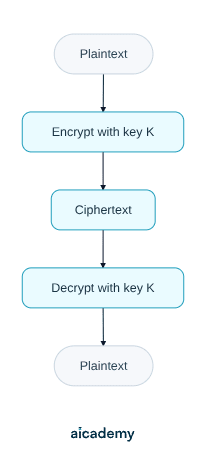
Advantages: fast; computationally efficient for large amounts of data.
Key distribution problem: how do the two parties share the key securely before they can communicate? If the key is intercepted during transmission, all future communication is compromised. This is the fundamental weakness of symmetric encryption.
Examples: AES (Advanced Encryption Standard).
Asymmetric Encryption and Key Exchange
In asymmetric encryption (public-key cryptography), each party has a key pair: a public key (shared openly) and a private key (kept secret).
Core property: a message encrypted with the public key can only be decrypted with the corresponding private key, and vice versa.
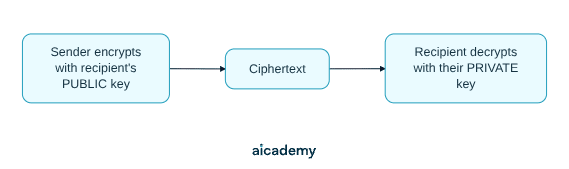
How asymmetric encryption solves the key distribution problem:
- Bob publishes his public key openly
- Alice encrypts a message (or a symmetric session key) with Bob's public key
- Only Bob — with his private key — can decrypt it
Key exchange: asymmetric encryption is typically used to securely exchange a symmetric key. The symmetric key then encrypts the bulk of the communication (because symmetric is faster). This hybrid approach is how HTTPS works.
Worth saving these ideas?
Turn what you've read into instant revision cards. Free to get started.
Key terms
- Firewall
- A device that monitors and controls network traffic according to security rules, acting as a barrier between a trusted internal network and untrusted external networks.
- Packet filtering
- A firewall technique that examines each packet's header and allows or blocks it based on a rule set; it is stateless and cannot inspect payload content.
- Proxy server
- An application-layer firewall that acts as an intermediary, making requests on the client's behalf to hide the internal network and optionally cache, filter, and log requests.
- Stateful inspection
- A firewall technique that tracks the state of active connections in a state table and only allows a packet if it belongs to an established, legitimate connection.
- Symmetric encryption
- Encryption in which the same key is used for both encryption and decryption; fast but subject to the key distribution problem.
- Asymmetric encryption
- Public-key cryptography in which each party has a public key shared openly and a private key kept secret, with each key able to decrypt what the other encrypted.
- Key distribution problem
- The challenge in symmetric encryption of sharing the key securely before communication; if intercepted in transit, all future communication is compromised.
- Digital certificate
- An electronic document that binds a public key to an entity and is signed by a trusted Certificate Authority.
- Certificate Authority (CA)
- A trusted body that signs digital certificates, validated up a chain of trust to a root CA pre-trusted by the browser or OS.
- Digital signature
- A value formed by encrypting the hash of a message with the sender's private key, proving the message's authenticity and integrity.
- Malware
- Malicious software designed to damage, disrupt, or gain unauthorised access to systems, exploiting software vulnerabilities.
Frequently asked questions
In symmetric encryption the same key is used to encrypt and decrypt, which is fast but creates the key distribution problem. In asymmetric encryption each party has a public key and a private key, where a message encrypted with the public key can only be decrypted with the matching private key.
No. A digital signature encrypts the hash of the message with the sender's private key, not the message itself. The message travels in plaintext or separately encrypted, and the signature proves authenticity and integrity rather than confidentiality.
A virus inserts itself into a host program and spreads through user action like copying files. A worm self-replicates across networks automatically without a host or user action. A Trojan disguises itself as legitimate software, does not self-replicate, and relies on the user installing it.
Generate revision on any topic you study
Type any topic you're studying and Aicademy generates a complete lesson, quiz, and flashcard set, personalised to your level.
Lessons on anything
Structured, level-matched lessons on any topic you study
Practice quizzes
Find out what you actually know before the exam does
Flashcard sets
Lock in key concepts with instant revision cards
Ask Aica
Stuck on something? Get a clear explanation, any time
The Internet and DNS
TCP/IP and Application Layer Protocols
Related lessons
6 min
6 min
6 min