CPU Architecture and the Fetch-Execute Cycle

Aligned to the OCR J277 specification
- Topic
- Systems architecture
- Level
- Intermediate
- Reading time
- 7 min
- Published
- 12 June 2026
- Updated
- 16 August 2026
On this page
Key takeaways
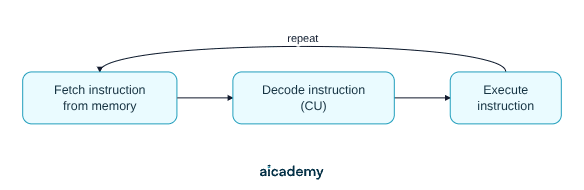
- The fetch-execute cycle has three stages - Fetch, Decode, Execute - and repeats continuously while the computer is on; it has three stages, not two.
- MAR stores a memory address (where to look); MDR stores the actual data fetched; PC stores the address of the next instruction; ACC stores the result of the last ALU calculation.
- The CU (Control Unit) coordinates and controls the CPU but does not perform calculations - arithmetic and logic operations are carried out by the ALU.
- Cache is a small, fast memory store on or near the CPU chip; it is not RAM and not secondary storage - registers are fastest, then cache, then RAM.
CPU Components and Their Roles
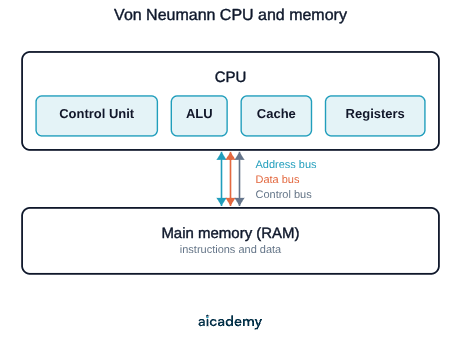
The CPU contains several key components:
| Component | Full name | Role |
|---|---|---|
| ALU | Arithmetic Logic Unit | Performs arithmetic (add, subtract) and logical operations (AND, OR, NOT, comparisons) |
| CU | Control Unit | Directs the operation of the processor; coordinates fetching, decoding and executing instructions |
| Cache | — | A small, very fast memory store built into the CPU; holds frequently used data and instructions to speed up access |
| Registers | — | Small, extremely fast storage locations inside the CPU; hold data or addresses being actively used |
The CU does not perform calculations — that is the ALU's job. The CU manages the flow of data and instructions, telling other components what to do and when.
The diagram below shows how these components sit inside the CPU and connect to main memory over the system bus.
The Fetch-Execute Cycle in Detail
The CPU continuously repeats this cycle:
Fetch:
- The address of the next instruction is copied from the PC to the MAR
- The instruction at that address is fetched from memory into the MDR
- The PC is incremented (increased by 1) to point to the next instruction
Decode: 4. The CU reads the instruction from the MDR and decodes it — determines what operation is required
Execute: 5. The appropriate action is carried out. If it involves a calculation, the ALU performs it and the result is stored in the ACC
The three stages run as a continuous loop — after executing one instruction, the CPU immediately fetches the next.
Worked example — CPU executes "add 5 to the current value":
- PC holds address 100 → MAR ← 100 → fetch instruction at address 100 into MDR
- PC increments to 101 (ready for next instruction)
- CU decodes the instruction: "ADD"
- ALU takes the value in ACC (say, 10) and adds 5 → ACC now holds 15
OCR J277 requires understanding of what each register stores and whether it holds data or an address. Knowledge of exactly how data passes between registers in each step is NOT required.
Studying this for an exam?
Generate a personalised learning path for this subject. Free to get started.
Key terms
- CPU
- The Central Processing Unit - the component that fetches, decodes, and executes program instructions, often called the processor.
- Fetch-execute cycle
- The continuous three-stage loop (Fetch, Decode, Execute) the CPU repeats to process every instruction in a program.
- ALU
- The Arithmetic Logic Unit - the part of the CPU that performs arithmetic operations (add, subtract) and logical operations (AND, OR, NOT, comparisons).
- CU
- The Control Unit - coordinates the operation of the CPU, decoding instructions and managing the flow of data between components.
- MAR
- Memory Address Register - holds the address of the memory location to be read from or written to during the fetch stage.
- MDR
- Memory Data Register - holds the actual data or instruction that has been fetched from memory or is about to be written to it.
- PC
- Program Counter - stores the memory address of the next instruction to be fetched, and is incremented after each fetch.
- ACC
- Accumulator - stores the result of the most recent arithmetic or logic operation performed by the ALU.
- Cache
- A small, extremely fast memory store on or near the CPU chip that holds recently used data and instructions to reduce the number of slower RAM accesses.
- Von Neumann architecture
- The design principle underlying most computers, where both program instructions and data are stored in the same main memory and fetched by the same CPU.
Frequently asked questions
MAR holds a memory address (where to fetch from). MDR holds the actual data or instruction fetched. PC holds the address of the next instruction to fetch. ACC holds the result of the most recent ALU operation. MAR and PC store addresses; MDR and ACC store data.
The Control Unit (CU) coordinates and manages the fetch-decode-execute cycle - it decodes instructions and tells other components what to do. The ALU (Arithmetic Logic Unit) actually performs arithmetic (add, subtract) and logical operations (AND, OR, NOT, comparisons).
Cache is a small, very fast memory store built into or near the CPU that holds frequently used data and instructions. RAM is separate, much larger, and slower. A cache hit means data is found in cache (fast); a cache miss means the CPU must fetch from the slower RAM.
Generate revision on any topic you study
Type any topic you're studying and Aicademy generates a complete lesson, quiz, and flashcard set, personalised to your level.
Lessons on anything
Structured, level-matched lessons on any topic you study
Practice quizzes
Find out what you actually know before the exam does
Flashcard sets
Lock in key concepts with instant revision cards
Ask Aica
Stuck on something? Get a clear explanation, any time
Programming Languages and IDEs
CPU Performance and Embedded Systems
Related lessons
7 min
7 min