Track progress, take quizzes and save notes on this lesson.

Free forever · no card needed

Start free
Intermediate

Relational Databases and SQL

3.7 Relational databases and structured query language (SQL)

Aligned to the AQA 8525 specification

Level
Intermediate
Reading time
8 min
Published
8 June 2026
Updated
1 July 2026
On this page
  1. 1.Relational Databases: Tables, Records and Fields
  2. 2.Primary Keys and Foreign Keys
  3. 3.SELECT Queries: Retrieving Data
  4. 4.Sorting with ORDER BY
  5. 5.INSERT, UPDATE and DELETE
  6. 6.Querying Two Tables
  7. 7.Common Exam Mistakes

Key takeaways

  • A relational database stores data in one or more linked tables; a field is a column (one attribute), a record is a row (all data for one entity), and a data type is the type of value a field holds.
  • A primary key uniquely identifies each record in its own table and can never be NULL; a foreign key is a field holding another table's primary key value, creating a link between the tables.
  • SQL clauses must be written in a fixed order: SELECT then FROM then WHERE then ORDER BY; writing them in the wrong order is a syntax error.
  • UPDATE and DELETE without a WHERE clause affect every row in the table, so always include WHERE to target the correct records.
  • To query two tables, list both in the FROM clause and match the primary key to the foreign key in WHERE, using dot notation like Students.Name where field names are shared.

Relational Databases: Tables, Records and Fields

A database is an organised collection of data stored so it can be efficiently retrieved, updated, and managed. A relational database stores data in one or more tables that can be linked to each other.

Every table has the same structure:

TermMeaningExample
TableA collection of related data organised into rows and columnsStudents table
FieldA column — one attribute of the entityStudentID, Name, DateOfBirth
RecordA row — all the data for one entity(101, 'Alice Brown', '2008-05-12')
Data typeThe type of value a field holdsInteger, String, Date, Boolean

Example: a Students table

StudentIDNameYearEmail
101Alice Brown10alice@school.com
102Ben Clarke11ben@school.com
103Clara Davis10clara@school.com

Each row is one record. Each column is one field. Every record in the table follows the same structure — the same fields in the same order.

(Extra context — not required by AQA 8525) A flat file stores all data in a single table, causing duplication — the same student's name might appear 30 times across 30 exam entries. A relational database splits data across linked tables, storing each fact exactly once. This is why relational databases are preferred for any system with related data.

Primary Keys and Foreign Keys

Every table in a relational database needs a way to uniquely identify each record. This is done with keys.

A primary key is a field (or combination of fields) whose value is unique for every record in the table. No two records in the same table can share the same primary key value, and it can never be NULL.

A foreign key is a field in one table that contains the primary key value from another table. It creates a link between the two tables.

Example: linking Students and Results tables

Students table:

StudentID (PK)NameYear
101Alice Brown10
102Ben Clarke11

Results table:

ResultID (PK)StudentID (FK)SubjectGrade
1101MathsA
2101EnglishB
3102MathsC

StudentID is the primary key in Students and a foreign key in Results. The foreign key in Results points back to the primary key in Students — this is how the tables are linked.
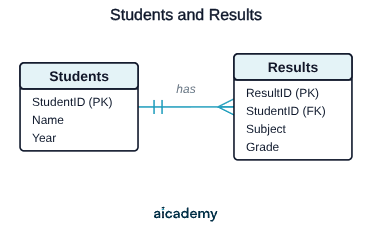
One student can have many results, but each result belongs to exactly one student — a one-to-many relationship.

Why this matters:

  • Alice's name (Alice Brown) is stored only once, in Students.
  • Her results reference her by StudentID = 101.
  • If her name changes, it is updated in one place only — not in every results record.

Primary keys prevent duplicate records. Foreign keys prevent orphaned records — a result cannot reference a student who does not exist. Together they maintain data integrity.

SELECT Queries: Retrieving Data

SQL (Structured Query Language) is the language used to interact with relational databases. The most common operation is retrieving data with SELECT.

Basic syntax:

SELECT field1, field2
FROM tableName
WHERE condition

Retrieve all fields using *:

SELECT *
FROM Students

Returns every field and every record from the Students table.

Retrieve specific fields:

SELECT Name, Email
FROM Students

Returns only the Name and Email columns for all students.

Filter records with WHERE:

SELECT Name, Email
FROM Students
WHERE Year = 10

Returns only students in Year 10.

Multiple conditions use AND and OR:

SELECT Name, Grade
FROM Results
WHERE Subject = 'Maths' AND Grade = 'A'
SELECT Name
FROM Students
WHERE Year = 10 OR Year = 11

WHERE uses = for equality (not ==). String values are enclosed in single quotes. Numeric values are not: WHERE Year = 10, not WHERE Year = '10'.

Sorting with ORDER BY

ORDER BY sorts the results of a query by one or more fields. ASC sorts ascending (A→Z, 0→9); DESC sorts descending (Z→A, 9→0). ASC is the default if neither is specified.

SELECT Name, Grade
FROM Results
WHERE Subject = 'Maths'
ORDER BY Grade ASC

Returns maths results sorted alphabetically by grade (A, B, C...).

SELECT Name, Score
FROM Results
ORDER BY Score DESC

Returns all results with the highest score first.

Combined WHERE and ORDER BY:

SELECT Name, Score
FROM Results
WHERE Subject = 'Computer Science'
ORDER BY Score DESC

Returns computer science results only, sorted highest score first — exactly the kind of query asked in AQA exam questions.

ORDER BY always comes after WHERE. The order of clauses is fixed: SELECTFROMWHEREORDER BY. Writing them in the wrong order is a syntax error.

Studying this for an exam?

Generate a personalised learning path for this subject. Free to get started.

Create a learning path

INSERT, UPDATE and DELETE

SQL provides three commands for modifying data:

INSERT INTO — adds a new record to a table:

INSERT INTO Students (StudentID, Name, Year, Email)
VALUES (104, 'Dan Evans', 10, 'dan@school.com')

The field names and values must match in order and data type. Every field that cannot be NULL must be given a value.

UPDATE — modifies existing records. Always use WHERE to target specific records:

UPDATE Students
SET Year = 11
WHERE StudentID = 101

Changes Alice's year from 10 to 11. Without the WHERE clause, every record in the table would be updated.

DELETE FROM — removes records. Always use WHERE:

DELETE FROM Students
WHERE StudentID = 103

Deletes Clara's record. Without WHERE, every record in the table is deleted permanently.

UPDATE and DELETE without a WHERE clause affect every row in the table. Always write the WHERE clause first before writing SET or the rest of the command — this forces you to think about which records are being targeted. This is not just good practice; it is a mark scheme requirement in exam questions.

Querying Two Tables

A relational database's power comes from linking tables. AQA exam questions can require data extracted from up to two tables in a single query.

To query two tables, both are listed in the FROM clause, and WHERE specifies which records match using the primary key and foreign key:

SELECT Students.Name, Results.Subject, Results.Grade
FROM Students, Results
WHERE Students.StudentID = Results.StudentID

This links every student to their results by matching the StudentID fields. The dot notation (Students.Name) specifies which table each field comes from — required when both tables have a field with the same name.

Worked example — Find the names and grades of all Year 10 students in Maths:

SELECT Students.Name, Results.Grade
FROM Students, Results
WHERE Students.StudentID = Results.StudentID
AND Students.Year = 10
AND Results.Subject = 'Maths'
ORDER BY Students.Name ASC

Breaking this query down:

  1. FROM Students, Results — work with both tables
  2. Students.StudentID = Results.StudentID — match records across tables
  3. Students.Year = 10 — filter to Year 10 only
  4. Results.Subject = 'Maths' — filter to Maths only
  5. ORDER BY Students.Name ASC — sort the output alphabetically

Normalisation, entity-relationship diagrams, and JOIN syntax are not required by AQA 8525. The two-table query pattern above covers everything the spec assesses.

Common Exam Mistakes

1. Forgetting WHERE on UPDATE or DELETE

UPDATE Students SET Year = 11 updates every student to Year 11. DELETE FROM Students deletes every student. Always include WHERE on these commands to target the correct records.

2. Using == instead of = in SQL WHERE clauses

SQL uses a single = for equality in conditions: WHERE Year = 10. Writing WHERE Year == 10 is a syntax error. This is the opposite of Python, where = is assignment and == is comparison.

3. Writing clauses in the wrong order

The required order is SELECTFROMWHEREORDER BY. Writing WHERE before FROM, or ORDER BY before WHERE, is a syntax error and will score zero for that query.

4. Not using dot notation when querying two tables

When both tables have a field with the same name (e.g. both have Name, or both reference StudentID), omitting the table prefix creates ambiguity and an error. Write Students.Name and Results.Name — not just Name.

5. Confusing primary key and foreign key

The primary key uniquely identifies each record in its own table. The foreign key is a copy of another table's primary key, used to link the tables. A foreign key lives in the table that references another — not in the table being referenced.

Key terms

Relational database
A database that stores data in one or more tables which can be linked to each other.
Table
A collection of related data organised into rows and columns.
Field
A column in a table representing one attribute of the entity.
Record
A row in a table containing all the data for one entity.
Primary key
A field (or combination of fields) whose value is unique for every record in a table and can never be NULL.
Foreign key
A field in one table that contains the primary key value from another table, creating a link between the two.
SQL
Structured Query Language, the language used to interact with relational databases.
ORDER BY
An SQL clause that sorts query results by one or more fields, ascending (ASC) by default or descending (DESC).

Frequently asked questions

A primary key uniquely identifies each record within its own table and can never be NULL. A foreign key is a copy of another table's primary key, stored in the table that references it, and is used to link the two tables together.

The required order is SELECT, then FROM, then WHERE, then ORDER BY. Writing them in any other order, such as WHERE before FROM or ORDER BY before WHERE, is a syntax error and scores zero for that query.

Without a WHERE clause, UPDATE changes every record in the table and DELETE removes every record permanently. The WHERE clause targets only the specific records you intend to modify, so it should always be included on these commands.

Generate revision on any topic you study

Type any topic you're studying and Aicademy generates a complete lesson, quiz, and flashcard set, personalised to your level.

Lessons on anything

Structured, level-matched lessons on any topic you study

Practice quizzes

Find out what you actually know before the exam does

Flashcard sets

Lock in key concepts with instant revision cards

Ask Aica

Stuck on something? Get a clear explanation, any time

Prev

Cyber Security: Threats and Defences

Next

Ethical, Legal and Environmental Impacts of Digital Technology

Related lessons

Top students don’t revise more. They revise what counts.

Start revising free

Free to start. No card needed.

Relational Databases and SQL: GCSE Computer Science | Aicademy