Track progress, take quizzes and save notes on this lesson.

Free forever · no card needed

Start free
Intermediate

Arrays and Records

3.2.6 Data structures

Aligned to the AQA 8525 specification

Level
Intermediate
Reading time
8 min
Published
8 June 2026
Updated
1 July 2026
On this page
  1. 1.What Is an Array and Why Use One
  2. 2.1D Arrays: Declaring and Accessing Elements
  3. 3.Traversing a 1D Array
  4. 4.2D Arrays
  5. 5.Records
  6. 6.Swap Algorithm and Array Algorithms
  7. 7.Common Exam Mistakes

Key takeaways

  • An array stores multiple values of the same data type under one identifier, with each element accessed by an integer index.
  • AQA pseudocode uses zero-based indexing, so an array with n elements has valid indices 0 to n − 1; accessing an index outside this range is an out-of-bounds error.
  • A record groups related values that may have different data types under one identifier, each accessed by field name rather than index.
  • Swapping two array elements needs a temporary variable, because assigning one element to the other first overwrites and permanently loses the original value.
  • A 2D array is a grid accessed by two indices as array[row][column], used whenever data forms a natural grid like a seating plan or game board.

What Is an Array and Why Use One

An array is a data structure that stores multiple values of the same data type under a single identifier. Each value is accessed by its index — an integer indicating its position in the array.

Without an array, storing five test scores requires five separate variables:

score0 ← 72
score1 ← 85
score2 ← 63
score3 ← 91
score4 ← 78

Processing all five then requires five separate lines of code. With an array, a loop handles any number of elements:

scores ← [72, 85, 63, 91, 78]
FOR i ← 0 TO 4
    OUTPUT scores[i]
NEXT i
PropertyDetail
Same data typeAll elements must be the same type — an integer array cannot hold strings
Fixed sizeThe number of elements is determined when the array is declared
Zero-based indexingThe first element is at index 0; a 5-element array uses indices 0 to 4
Random accessAny element can be read or written directly using its index

In AQA pseudocode, scores[0] accesses the first element, scores[4] the fifth. An array with n elements has valid indices 0 to n − 1. Accessing an index outside this range is an out-of-bounds error.

1D Arrays: Declaring and Accessing Elements

A one-dimensional (1D) array is a flat, ordered list of values.

Declaration and element access:

days ← ["Mon", "Tue", "Wed", "Thu", "Fri", "Sat", "Sun"]

OUTPUT days[0]        # Mon
OUTPUT days[3]        # Thu
days[5] ← "Weekend"  # overwrite "Sat"
OUTPUT days[5]        # Weekend
days = ["Mon", "Tue", "Wed", "Thu", "Fri", "Sat", "Sun"]
print(days[0])        # Mon
days[5] = "Weekend"
print(days[5])        # Weekend

Worked example — Store five temperatures and find the one at a user-specified index:

temps ← [12.5, 15.0, 9.3, 18.7, 14.1]
OUTPUT "Enter an index (0–4): "
idx ← USERINPUT
OUTPUT "Temperature: " & STR(temps[idx])

Worked example — Store exam grades and count how many are 'A':

grades ← ["B", "A", "C", "A", "A", "B"]
count ← 0
FOR i ← 0 TO 5
    IF grades[i] = "A" THEN
        count ← count + 1
    ENDIF
NEXT i
OUTPUT count    # 3

Traversing a 1D Array

Traversal means visiting every element in an array in sequence, typically using a FOR loop where the loop variable serves as the index.

Worked example — Calculate the total and average of an array of scores:

scores ← [72, 85, 63, 91, 78]
total ← 0
FOR i ← 0 TO 4
    total ← total + scores[i]
NEXT i
average ← total / 5
OUTPUT "Total: " & STR(total)
OUTPUT "Average: " & STR(average)

total is an accumulator — initialised to 0 before the loop, then incremented each iteration. This pattern appears in nearly every array-processing exam question.

Worked example — Find the maximum value in an array:

scores ← [72, 85, 63, 91, 78]
maximum ← scores[0]          # start by assuming the first is largest
FOR i ← 1 TO 4               # compare the rest
    IF scores[i] > maximum THEN
        maximum ← scores[i]
    ENDIF
NEXT i
OUTPUT maximum    # 91

Start the maximum at scores[0] (not at 0 or a guessed value). Update whenever a larger value is found. The same pattern finds the minimum by reversing the comparison to <.

Always use TO length − 1 as the upper bound (or the last valid index explicitly). For a 5-element array this is TO 4. Writing TO 5 reads index 5 — a position that does not exist.

2D Arrays

A two-dimensional (2D) array is a grid of values organised into rows and columns. Two indices are required: array[row][column].

grid ← [[1, 2, 3],
         [4, 5, 6],
         [7, 8, 9]]

OUTPUT grid[0][0]    # 1  (row 0, column 0)
OUTPUT grid[1][2]    # 6  (row 1, column 2)
OUTPUT grid[2][0]    # 7  (row 2, column 0)
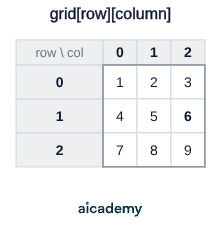
The cell in bold is grid[1][2] — row index 1, column index 2 — which holds 6.

Worked example — Store and display marks for 3 students across 2 papers:

marks ← [[72, 85],
          [63, 91],
          [78, 80]]

FOR row ← 0 TO 2
    FOR col ← 0 TO 1
        OUTPUT marks[row][col]
    NEXT col
NEXT row

Output order: 72, 85, 63, 91, 78, 80. The inner loop completes one full pass for each iteration of the outer loop — a 3×2 grid produces 6 outputs.

Worked example — Calculate the total marks for each student (row totals):

FOR row ← 0 TO 2
    rowTotal ← 0
    FOR col ← 0 TO 1
        rowTotal ← rowTotal + marks[row][col]
    NEXT col
    OUTPUT "Student " & STR(row + 1) & " total: " & STR(rowTotal)
NEXT row

Use a 2D array whenever data forms a natural grid: a seating plan, a game board, a timetable, or exam marks across multiple subjects.

Studying this for an exam?

Generate a personalised learning path for this subject. Free to get started.

Create a learning path

Records

A record is a data structure that groups related values which may have different data types under a single identifier. Each value is a field, accessed by name rather than index.

RECORD Student
    name      : STRING
    age       : INTEGER
    grade     : CHARACTER
    score     : REAL
ENDRECORD

pupil1.name  ← "Alice"
pupil1.age   ← 16
pupil1.grade ← 'A'
pupil1.score ← 87.5

OUTPUT pupil1.name & " achieved grade " & pupil1.grade
# Python represents records as dictionaries or objects
pupil1 = {"name": "Alice", "age": 16, "grade": "A", "score": 87.5}
print(pupil1["name"] + " achieved grade " + pupil1["grade"])

Array vs Record — key distinction:

FeatureArrayRecord
Element typesAll the same typeFields can be different types
Access methodBy integer index: arr[i]By field name: record.field
RepresentsA collection of similar itemsOne entity with multiple attributes
Example30 student scoresOne student's name, age, grade, score

Arrays of records combine both: a 1D array where each element is a record. This is how a class register or product catalogue is naturally represented — a list of entities, each with multiple attributes of different types.

Swap Algorithm and Array Algorithms

Two algorithms appear repeatedly in array exam questions:

Swapping two elements — requires a temporary variable to avoid overwriting:

# Swap scores[0] and scores[1]
temp      ← scores[0]
scores[0] ← scores[1]
scores[1] ← temp

Without temp, the first assignment scores[0] ← scores[1] overwrites the original scores[0] before it has been saved. The value is permanently lost.

Linear search — find the index of a target value:

target ← 91
found  ← FALSE
FOR i ← 0 TO 4
    IF scores[i] = target THEN
        OUTPUT "Found at index " & STR(i)
        found ← TRUE
    ENDIF
NEXT i
IF NOT found THEN
    OUTPUT "Value not in array"
ENDIF

The found flag is initialised to FALSE before the loop and set to TRUE when the target is located. Checking found after the loop handles the case where the value is absent. (For a full comparison of linear and binary search, see the Searching Algorithms lesson.)

The swap, find-maximum, accumulate-total, and linear-search patterns cover the vast majority of array manipulation marks in AQA exam questions. Practise writing each one from memory.

Common Exam Mistakes

1. Using 1-based instead of 0-based indexing

AQA pseudocode uses 0-based indexing. A 5-element array has valid indices 0–4. Writing FOR i ← 1 TO 5 misses index 0 and attempts to access index 5, which does not exist.

2. Forgetting the temporary variable in a swap

scores[0] ← scores[1] then scores[1] ← scores[0] copies the same value into both elements. scores[0]'s original value is gone. Always save to temp first.

3. Initialising the maximum to 0

maximum ← 0 works only when all array values are positive. If any value could be negative or zero, the maximum is initialised incorrectly. Always set maximum ← array[0] and begin comparisons from index 1.

4. Confusing arrays and records

An array holds many values of the same type; a record holds fields of different types for one entity. Storing a student's name (string), age (integer), and score (real) together requires a record, not an array.

5. Out-of-bounds access in traversal

For a 5-element array (indices 0–4), FOR i ← 0 TO 4 is correct. FOR i ← 0 TO 5 or FOR i ← 0 TO LEN(scores) without subtracting 1 reads one position past the end of the array.

Key terms

Array
A data structure that stores multiple values of the same data type under a single identifier, each accessed by its index.
Index
An integer indicating the position of an element in an array; AQA pseudocode counts from 0.
1D array
A one-dimensional array: a flat, ordered list of values accessed by a single index.
2D array
A two-dimensional array: a grid of values organised into rows and columns, accessed by two indices as array[row][column].
Record
A data structure that groups related values which may have different data types under one identifier, each accessed by field name.
Field
A single named value within a record, accessed by name rather than by index.
Traversal
Visiting every element in an array in sequence, typically using a FOR loop where the loop variable serves as the index.
Accumulator
A variable initialised to 0 before a loop and incremented each iteration to build up a running total.
Linear search
An algorithm that finds the index of a target value by checking each element in turn, using a found flag to handle absent values.
Out-of-bounds error
An error caused by accessing an index outside the valid range 0 to n − 1 of an n-element array.

Frequently asked questions

An array holds many values of the same data type accessed by integer index, while a record groups fields that may be different data types, each accessed by field name. An array represents a collection of similar items; a record represents one entity with multiple attributes.

AQA pseudocode uses zero-based indexing, so the first element is at index 0 and a 5-element array uses indices 0 to 4. Writing FOR i ← 1 TO 5 misses index 0 and tries to access index 5, which does not exist.

Without a temporary variable, the first assignment scores[0] ← scores[1] overwrites the original value of scores[0] before it has been saved, so that value is permanently lost. Saving to temp first preserves it for the second assignment.

Generate revision on any topic you study

Type any topic you're studying and Aicademy generates a complete lesson, quiz, and flashcard set, personalised to your level.

Lessons on anything

Structured, level-matched lessons on any topic you study

Practice quizzes

Find out what you actually know before the exam does

Flashcard sets

Lock in key concepts with instant revision cards

Ask Aica

Stuck on something? Get a clear explanation, any time

Prev

Selection and Iteration

Next

Subroutines: Procedures and Functions

Related lessons

6 min

8 min

Top students don’t revise more. They revise what counts.

Start revising free

Free to start. No card needed.