Track progress, take quizzes and save notes on this lesson.

Free forever · no card needed

Start free
Intermediate

Data Representation

1.2.4 Data storage (characters, images, sound)·1.2.5 Compression

Aligned to the OCR J277 specification

Level
Intermediate
Reading time
9 min
Published
12 June 2026
Updated
1 July 2026
On this page
  1. 1.Why Binary Representation Matters
  2. 2.Characters — ASCII and Unicode
  3. 3.Images — Pixels and Binary
  4. 4.Sound — Sampling and Digital Storage
  5. 5.Compression
  6. 6.Common Exam Mistakes

Key takeaways

  • n bits can represent 2^n different values - this governs character sets (7-bit ASCII = 128 characters), colour depth (8-bit = 256 colours), and audio bit depth.
  • Unicode extends ASCII and is backwards-compatible - its first 128 values are identical to ASCII codes; it does not replace ASCII, it subsumes it.
  • Image file size = colour depth (bits) x height (pixels) x width (pixels); increasing colour depth from 8-bit to 24-bit triples the file size.
  • Audio file size = sample rate x duration (seconds) x bit depth; sample rate affects how often you measure, bit depth affects how precisely each sample is stored.
  • Lossy compression permanently removes data and cannot be undone; lossless compression reduces size without losing any data so the original can be perfectly reconstructed.

Why Binary Representation Matters

All data a computer works with — whether a letter, a photograph, a song, or a word document — must be stored as binary (sequences of 0s and 1s). This is because the hardware that makes up a computer can only distinguish two states: on (1) and off (0).

Different types of data need different encoding schemes:

  • Characters need a standard mapping from symbols to numbers (e.g. ASCII, Unicode)
  • Images need a way to represent a grid of coloured pixels as bit patterns
  • Sound needs a method of recording a continuous wave as discrete binary samples
  • Files can be made smaller without losing important information through compression

Understanding these encoding schemes is not just theoretical — it determines file sizes, transmission speeds, quality trade-offs, and the software needed to decode the data. This lesson covers all four areas as required by OCR J277 1.2.4 and 1.2.5.

Characters — ASCII and Unicode

Computers store all data as binary. To store text, each character (letter, digit, punctuation mark) must be mapped to a binary code. This mapping is called a character set.

ASCII (American Standard Code for Information Interchange):

  • Uses 7 bits per character (extended ASCII uses 8 bits; OCR J277 exams use 8-bit ASCII)
  • Can represent characters (or with 8 bits)
  • Covers: uppercase letters A–Z, lowercase a–z, digits 0–9, common punctuation
  • Characters are logically ordered — 'A' has a specific code; 'B' has a code exactly one more than 'A'; 'a' is further along still

Unicode:

  • Uses more bits per character (versions include 16-bit and 32-bit representations)
  • Can represent over 1 million distinct characters
  • Covers every written language, mathematical symbols, emoji, and more
  • Is backwards-compatible — the first 128 Unicode values match ASCII

OCR J277 requires understanding of the differences between ASCII and Unicode and why more bits means more characters representable. Memorisation of specific character codes is NOT required.

Key relationship: bits can represent different characters.

Bits per characterCharacters representable
7
8
16
32 billion

Worked example — why does 'B' have a character code one more than 'A'?

Because character sets are logically ordered — consecutive characters have consecutive codes. If 'A' = 65, then 'B' = 66, 'C' = 67, etc. This allows programs to sort alphabetically using code comparisons.

Images — Pixels and Binary

A digital image is made up of a grid of pixels (picture elements). Each pixel has a single colour, which is stored as a binary number.

In the simplest case — 1-bit colour depth — each pixel is either black (1) or white (0). The grid below stores an 8×8 black-and-white image; each row of 8 pixels is one byte of binary.
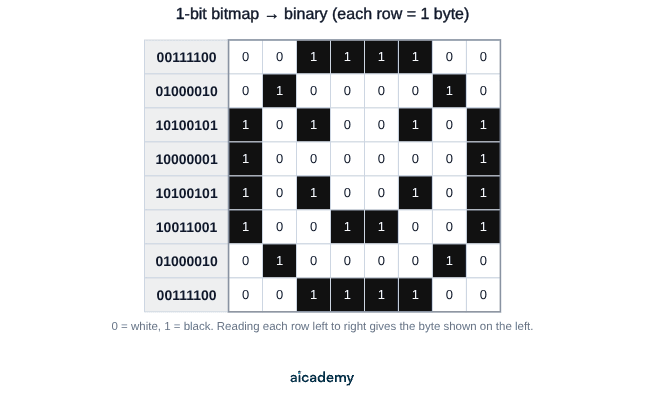
Colour depth is the number of bits used to represent the colour of a single pixel:

  • 1-bit colour depth: 2 colours (black and white only)
  • 8-bit colour depth: colours
  • 24-bit colour depth: million colours

Resolution is the number of pixels in the image (width × height in pixels).

Metadata is additional information stored alongside the image data — e.g. image dimensions (height and width), colour depth, file format. Metadata does not form part of the visible image but is needed to interpret it correctly.

Effect of colour depth on image:

  • Higher colour depth → more colours available → more realistic image quality → larger file size
  • Lower colour depth → fewer colours → banding/graininess → smaller file size

Effect of resolution on image:

  • Higher resolution (more pixels) → more detail → larger file size
  • Lower resolution → less detail → smaller file size

Worked example — an image is 400 pixels wide × 300 pixels tall with 8-bit colour depth:

File size = colour depth × height × width = bits

bytes KB (using 1 KB = 1,000 bytes) ✓

If colour depth increases to 24 bits: bits = 360 KB — the file is 3× larger.

Sound — Sampling and Digital Storage

Sound in the physical world is an analogue signal — a continuous wave of varying pressure. Computers can only store digital data (discrete binary values), so analogue sound must be converted.

Sampling is the process of measuring (sampling) the amplitude of a sound wave at regular intervals. Each measurement is stored as a binary value.

Three key parameters:

ParameterDefinitionUnit
Sample rateNumber of samples taken per secondHz (Hertz)
Bit depthNumber of bits used to store each sampleBits (e.g. 16-bit)
DurationLength of the audio recordingSeconds

Effect of sample rate:

  • Higher sample rate → more samples per second → captures more detail → better audio quality → larger file size
  • Lower sample rate → fewer samples → less detail → lower quality → smaller file size

Effect of bit depth:

  • Higher bit depth → each sample can take more values → smoother, more accurate amplitude representation → larger file size
  • Lower bit depth → fewer possible values per sample → more quantisation noise → smaller file size

File size formula:

Worked example — a 30-second audio recording at 22,050 Hz sample rate, 16-bit depth:

bits bytes KB MB ✓

How much of this have you taken in?

Quiz yourself on this section, free, no card needed.

Test myself

Compression

As files grow larger (high-resolution images, long audio files, HD video), they take longer to transmit and more storage space. Compression reduces file size by encoding the data more efficiently.

OCR J277 requires knowledge of two types:

Lossy compression

Lossy compression permanently removes data from the file. The removed data is identified as least important to human perception (e.g. very high frequencies in audio, subtle colour variations in an image). Once removed, this data cannot be recovered.

Scenarios where lossy compression is appropriate:

  • Streaming music or video (file size matters more than perfect quality)
  • Images shared on social media or websites
  • Phone call audio

Advantages: Very high compression ratios — much smaller files than lossless Disadvantages: Quality is reduced and cannot be restored; repeated re-saving compounds quality loss

Examples: JPEG (images), MP3/AAC (audio), MP4/H.264 (video)

Lossless compression

Lossless compression reduces file size by encoding data more cleverly, without removing any information. The original file can be perfectly reconstructed by decompressing it.

How it works — repeated patterns are stored more efficiently. For example, instead of storing the same colour for 100 consecutive pixels individually, lossless compression stores "100 × red" in far fewer bits.

Scenarios where lossless compression is appropriate:

  • Text files, program executables (any change corrupts the data)
  • Medical images (must be exactly accurate)
  • Archiving files for long-term storage

Advantages: No quality loss; exact original can be reconstructed Disadvantages: Smaller compression ratios than lossy — files are not as small

Examples: PNG (images), FLAC (audio), ZIP (files)

OCR J277 does not require the ability to carry out specific compression algorithms (e.g. run-length encoding steps). Only the principles and trade-offs are required.

Common Exam Mistakes

1. Saying Unicode "replaces" ASCII

Unicode extends ASCII — its first 128 values are identical to ASCII codes. Unicode doesn't replace ASCII; it subsumes it and adds a vastly larger set of characters for other languages and symbols.

2. Confusing resolution and colour depth

Resolution = number of pixels (affects detail). Colour depth = bits per pixel (affects colour range). Both affect file size, but through different mechanisms.

3. Saying lossy compression "is always worse"

Lossy compression reduces quality, but for many applications (streaming, web images, social media) the quality reduction is imperceptible to human senses and the file size savings are significant. It is the right choice in those contexts.

4. Sample rate and bit depth confusion

Sample rate = how often you measure (Hz). Bit depth = how precisely you measure each sample (bits). Higher values of both improve quality but increase file size.

MistakeCorrection
"Increasing bit depth increases sample rate"They are independent; bit depth affects precision per sample, sample rate affects frequency of sampling
"Lossless compression makes files smaller than lossy"Lossy achieves greater compression by discarding data; lossless is smaller than uncompressed but larger than lossy
"ASCII can represent any character"ASCII covers only 128/256 characters; Unicode is needed for non-Latin languages, emoji, etc.

Key terms

Character set
A standard mapping from characters (letters, digits, punctuation) to binary codes used by computers to store and exchange text.
ASCII
American Standard Code for Information Interchange - a 7-bit (or 8-bit) character set representing 128 (or 256) characters including letters, digits, and punctuation.
Unicode
A character set using 16 or 32 bits per character that can represent over 1 million characters from every written language, backwards-compatible with ASCII.
Pixel
The smallest unit of a digital image; each pixel has one colour stored as a binary number.
Colour depth
The number of bits used to represent the colour of a single pixel; higher colour depth means more colours and a larger file size.
Resolution
The number of pixels in an image (width times height); higher resolution means more detail and a larger file size.
Metadata
Additional information stored alongside image data (such as dimensions and colour depth) needed to interpret the file correctly, not part of the visible image.
Sampling
The process of measuring the amplitude of a sound wave at regular intervals to convert an analogue signal into discrete digital values.
Sample rate
The number of audio samples taken per second, measured in Hz; higher sample rate means better quality and larger file size.
Bit depth
The number of bits used to store each audio sample; higher bit depth means more precise amplitude measurement and a larger file size.
Lossy compression
Compression that permanently removes data judged least important to perception; achieves high compression ratios but quality cannot be restored.
Lossless compression
Compression that encodes data more efficiently without removing any information; the original file can be perfectly reconstructed on decompression.

Frequently asked questions

ASCII uses 7 or 8 bits and represents up to 256 characters, covering basic Latin letters, digits, and punctuation. Unicode uses more bits (16 or 32) and can represent over 1 million characters including every written language and emoji. The first 128 Unicode values match ASCII exactly.

Resolution is the number of pixels in the image (width times height), affecting the amount of detail. Colour depth is the number of bits used per pixel, affecting how many colours are available. Both affect file size but through different mechanisms.

Use lossy compression when file size matters more than perfect quality, such as streaming music or video, sharing images on websites, or phone calls. Use lossless when data must be exactly preserved, such as text files, executable programs, or medical images.

Generate revision on any topic you study

Type any topic you're studying and Aicademy generates a complete lesson, quiz, and flashcard set, personalised to your level.

Lessons on anything

Structured, level-matched lessons on any topic you study

Practice quizzes

Find out what you actually know before the exam does

Flashcard sets

Lock in key concepts with instant revision cards

Ask Aica

Stuck on something? Get a clear explanation, any time

Prev

Number Systems and Data Units

Next

Networks and Topologies

Related lessons

Top students don’t revise more. They revise what counts.

Start revising free

Free to start. No card needed.