Comparison
GCSEPod vs Seneca vs BBC Bitesize: a guide for schools
Written for whoever spends the department budget. What each platform costs, what you are committing to, and how to read an attainment claim before you sign anything.

The Aicademy Team
Study team, Aicademy
12 min read
Everything below comes from the vendors’ own published pricing, contract terms and impact reporting, plus government guidance, all checked in September 2026 and linked at the end. Where a figure could not be verified from a primary source, that is said rather than estimated.
The short answer: three platforms doing three different jobs
- GCSEPod is school-purchased software. Staff set assignments and see who has done what, and the department gets reporting it can act on. That reporting, not the video library, is what schools are paying for.
- Seneca sells to students and to schools. The core courses are free and unlimited and homework can be set on them. Above that sit personal subscriptions, and three school packages that add MIS sync and reporting, only one of which has a public price.
- BBC Bitesize is a free public-service resource. No account, no licence, no procurement, effectively every GCSE subject at zero cost, and no visibility whatsoever into who used it.
What each one actually is
GCSEPod (Access Education)
GCSEPod is built around Pods: over 7,500 short videos of roughly three to five minutes, mapped to KS3 and KS4 content by exam board. Alongside the videos there are student learning activities, a quizzing layer called Check & Challenge with scaffolded hints and feedback, a student app, accessibility tools, and AI tools for lesson planning, marking and assignment creation. The content is examiner-created and exam-board aligned.
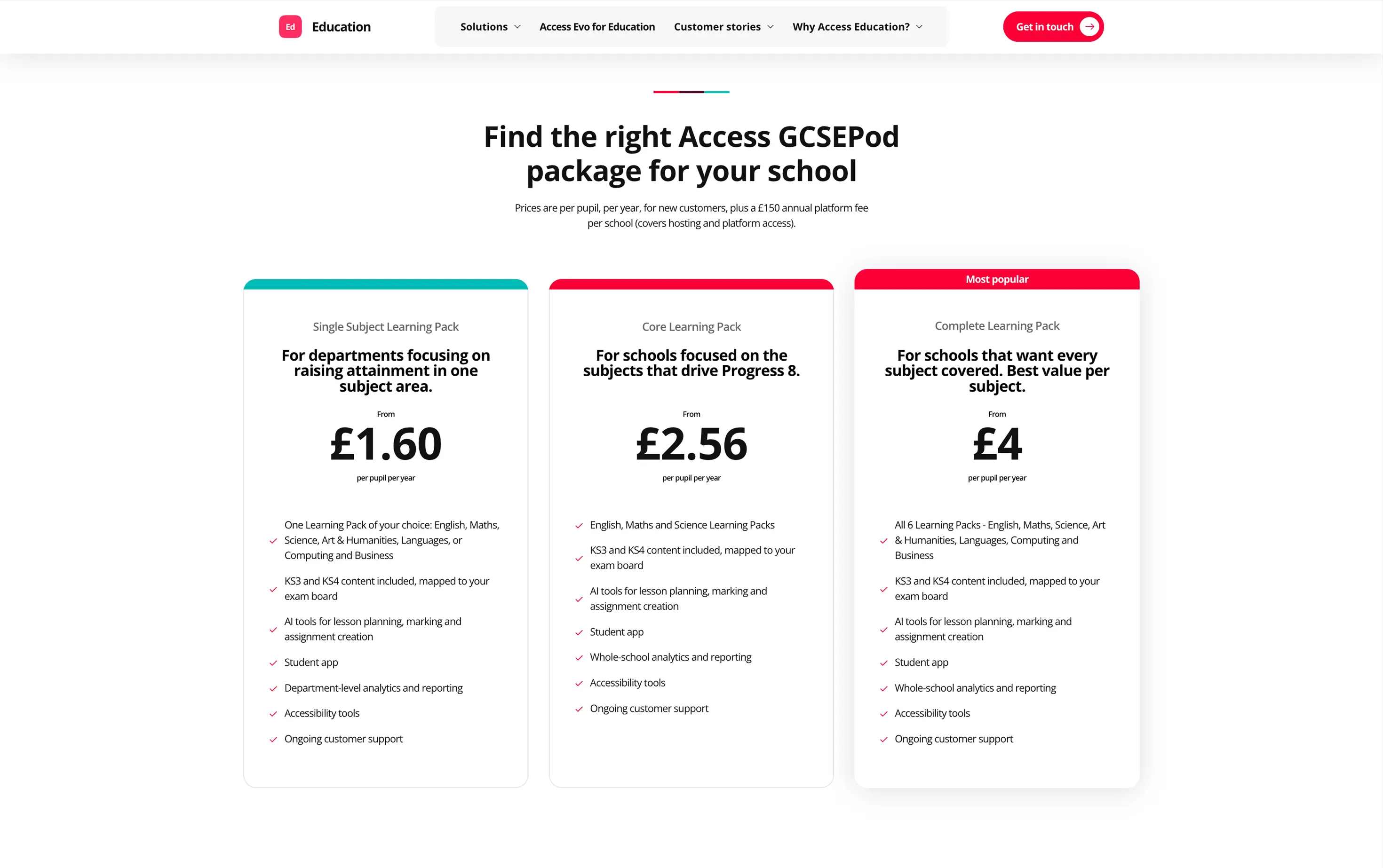
It is sold as three bundles drawn from six subject packs: English, maths, science, art and humanities, languages, and computing and business. Single Subject is any one of those, with department-level analytics only. Core is English, maths and science, and adds whole-school analytics and reporting, positioned explicitly around Progress 8. Complete is all six packs. There is no consumer plan: students log in through the school.
Be careful with the £1.60 that circulates in roundups. It is the Single Subject price, not what a school buying English, maths and science pays, and it excludes the platform fee, implementation and support.
Seneca Learning
Seneca’s core courses are genuinely free and unlimited, and that is the main product rather than a trial. Courses break a specification into short chunks and drill them with recall questions that resurface what a student got wrong. Its own trial, on a biology unit, found pupils scored higher on a later test than when rereading the same material, and Seneca says it is used in 96% of UK secondary schools.
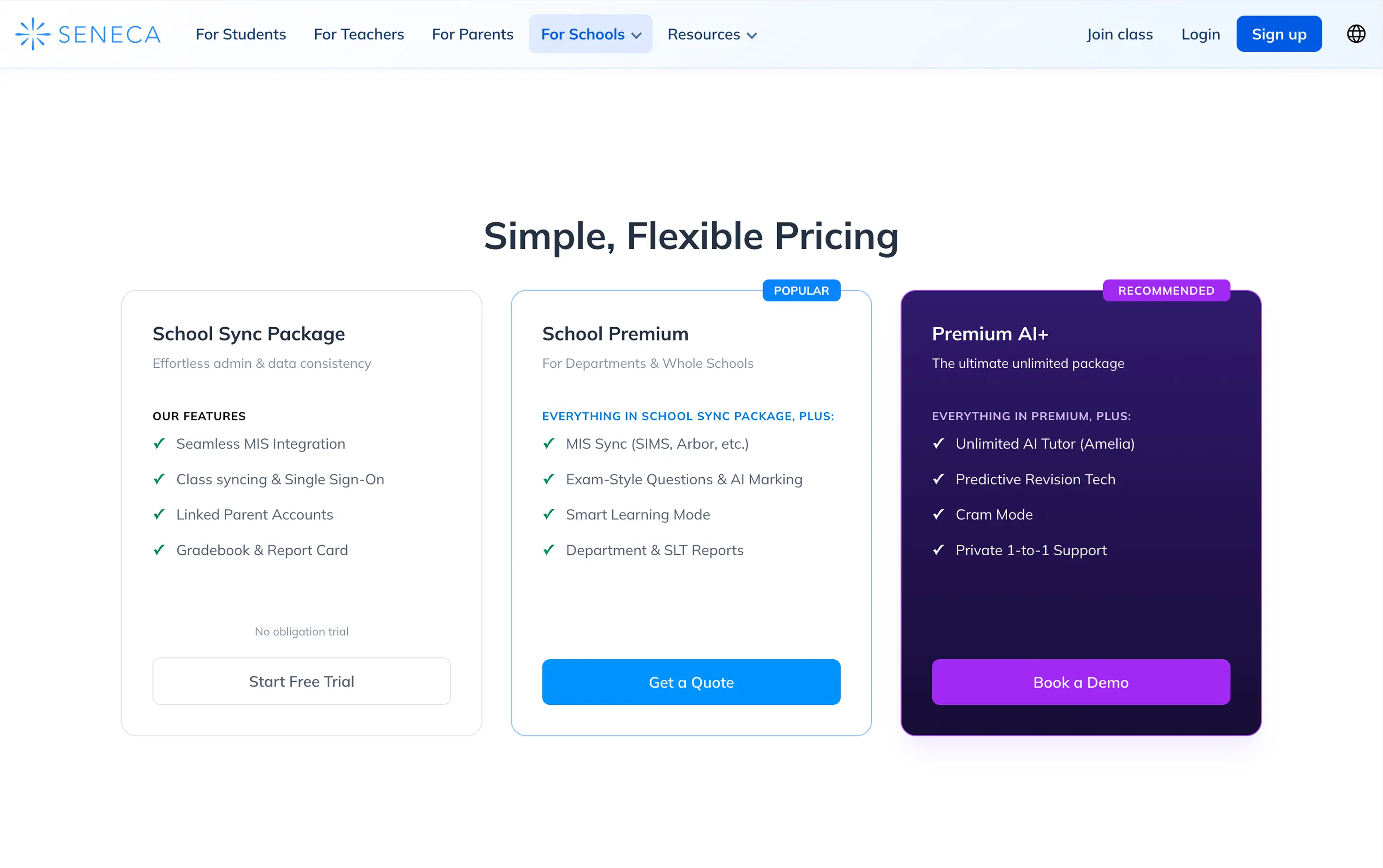
Students and parents can buy personal subscriptions at published prices, and schools can buy three packages of their own: School Sync Package, School Premium and Premium AI+. The school tiers carry the things a department asks for, including MIS sync with SIMS or Arbor, AI-marked exam-style questions, department and SLT reports, and the Amelia AI tutor on the top tier.
Pricing is published for one tier only. Seneca’s help centre gives School Sync as free for 12 months, then £646 excluding VAT a year for schools over 600 pupils. Premium is volume-based per-student pricing by quote, with trust discounts, and Premium AI+ is quote-only too.
One licensing rule matters more than the prices if you are buying for one subject. Seneca Premium, the tier with the exam marking and reporting, is sold whole-school or by year group, not to individual subjects or departments. School Sync is whole-school by default, and only Premium AI+ can be licensed for selected groups of students.
BBC Bitesize
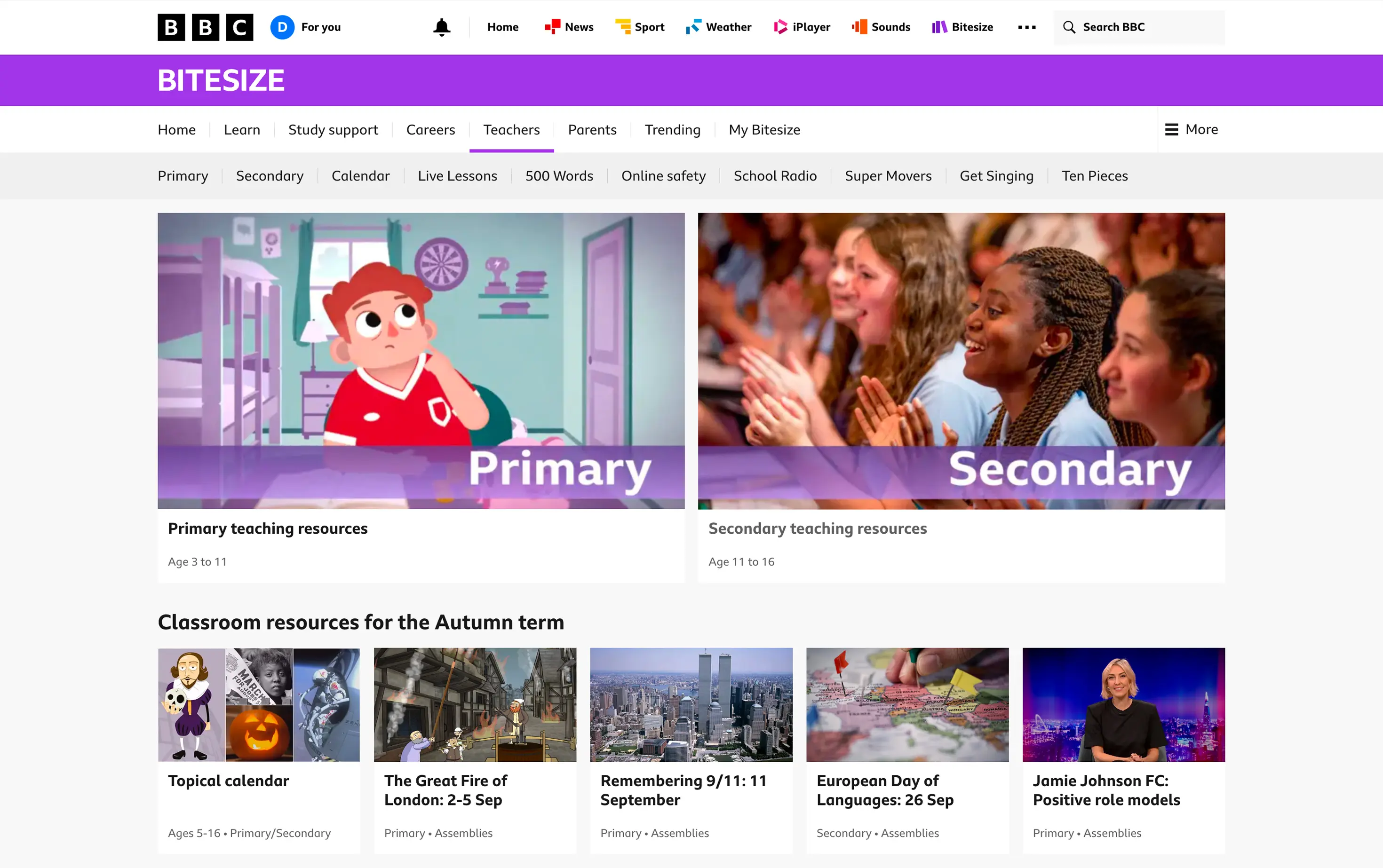
Bitesize is free, needs no account, and covers effectively every GCSE subject with notes, videos and quizzes aligned to the exam boards. It has no assignment setting, no class analytics and no integration of any kind, so it can support learning but cannot support intervention.
Two limits are worth knowing before you build schemes of work around it, and the BBC states both itself:
- Videos can disappear. Older films are licensed for a fixed number of years, and the BBC takes them down when a licence expires. It sometimes renews, but says this is not always possible. If a lesson depends on a specific clip, do not assume it will be there next year.
- Nothing can be downloaded. The BBC does not provide hard copies or downloads of its teacher content, so it is streaming only, which matters if your connectivity is unreliable.
Cost, and what you are actually buying
| GCSEPod | Seneca | BBC Bitesize | |
|---|---|---|---|
| Who buys it | The school | Students, parents or the school | Nobody |
| Per pupil per year | From £1.60 (single subject) · £2.56 (core) · £4 (complete) | Free core tier; Premium is per-student by quote | Free |
| Whole-school licence | From £2,100 · £3,600 · £6,000 per year | School Sync free for the first year, then £646 ex VAT (over 600 pupils); Premium quote-only | Not applicable |
| Onboarding and support | Priced separately (FlightPath, support plan) | Offered, cost not published | n/a |
| Assignment setting | Yes | Yes | No |
| Whole-school analytics | Yes | On paid tiers | No |
| MIS integration | Yes | On paid tiers | No |
| Minimum commitment | 36 months by default, set by package | Free tier none; Premium terms not published | None |
GCSEPod pricing from the Access Education pricing page and Seneca pricing from its help centre, both checked September 2026. All GCSEPod figures are “from” prices. Confirm current terms with the vendor before budgeting.
GCSEPod’s per-pupil prices also carry a £150 annual platform fee per school, covering hosting and platform access, and are quoted for new customers.
The arithmetic worth doing before a meeting is the break-even between the two GCSEPod models. On the Complete pack, the unlimited whole-school licence starts at £6,000 a year and the per-pupil price starts at £4 plus the £150 fee, so the licence only becomes the cheaper option above roughly 1,460 pupils. On the Core pack the same calculation gives about 1,350 pupils. A typical 11 to 16 secondary of 900 pupils pays £3,750 on the per-pupil model against £6,000 for the licence; a large all-through school is the other way round. Access’s pricing page does not do that sum for you.
For a first-pass comparison the difference is simple: you can budget GCSEPod from its website, but you cannot budget Seneca’s reporting tiers without talking to sales.
What you are actually signing
Access publishes its Core Terms, and they set the default shape of a GCSEPod agreement. None of it is unusual for enterprise contracting.
- Initial term: 36 months by default, unless the order form says otherwise.
- Renewal: automatic, for further 12-month periods.
- Notice to leave: 90 days before the end of a term, given through their online digital assistant rather than by email. Put that date in a diary the day you sign.
- Price rises: fees can rise once per contract year, and at the end of a term can revert to the then-current list price.
- Acceleration: if fees go overdue, all remaining committed fees across every order become immediately due.
- Usage thresholds: licences are sized to an agreed pupil number, and going over it means they invoice the excess and raise both the threshold and the fee the following year. Check how that number is counted before you agree it.
- Onboarding and support are separately priced, through the FlightPath implementation programme and a support plan whose default level is the entry one.
- AI features are governed by separate AI terms that override the core terms where the two conflict, so they need reading on their own.
- Using your school’s name in their marketing requires your prior written consent each time, which works in your favour.
The scrutiny only runs one way. Access publishes its terms, so they can be picked over. Seneca does not publish contract terms for its paid school tiers, so the initial term, notice period, renewal and price-rise clauses are unknown until you are in a sales conversation. An absence of published terms is not better terms. Ask for them in writing before comparing the two.
Run the numbers on the default term and the framing changes. A Complete whole-school licence advertised as “from £6,000 a year” is realistically a commitment of around £18,000 over three years, before implementation, before the support plan, and before any annual uplift. That may still be good value for a school of 1,500 with a serious intervention strategy. It is a very different proposition from a free product a student can stop using on a Tuesday, and a business case comparing the two on this year’s figure is comparing the wrong things.
The attainment evidence, and how to read it
GCSEPod markets a headline claim that students using it achieve on average 1.5 grades higher than non-users.
The claim is not invented. It traces to Access’s own Overall GCSEPod Impact Report for 2023/24, covering 1,081 Year 11 users, and Access publishes these reports: the latest is on GCSEPod’s EdTech Impact page. Access also states the central limitation itself, on the cover: GCSEPod is one tool and one measure, and staff, pupils and other school strategies play a part in outcomes, which means the causal framing in the marketing goes further than the report it rests on.
Three things follow, all from their own document.
- Users select themselves. The study compares users with non-users, and the trait that predicts engaging with a revision platform also independently predicts grades. No control group, randomisation or matching is described. This is the central limitation, and Access does not hide it, but nor does it lead with it.
- Their own Pupil Premium chart does not show what its caption says. Their average Attainment 8 per subject by usage quartile reads 3.32 for the bottom 25%, 3.95 for the middle 50% and 3.90 for the top 25%, so the heaviest users score fractionally below the middle group, not above it. The caption says the data confirms that Pupil Premium students who engage consistently achieve better outcomes. For that cohort, the chart does not show it.
- The subgroup samples are small. The Pupil Premium group is roughly 258 pupils across six schools, higher attainers number 122 and the EAL group 188, and the EAL comparison sets self-selected users against the national EAL average, which compares a subset with a whole population.
Comparing outcomes by how much pupils used it is the right shape of analysis. What would make it persuasive is comparing heavy users against similar pupils who did not use it, matched on prior attainment, Pupil Premium status and school context. That is a reasonable thing to ask a vendor for.
Apply the same standard to Seneca. Its evidence is a 2018 study in the Chartered College of Teaching’s Impact journal. The journal is independent, but Seneca’s own science team ran the study, and the paper says so. The design is stronger than GCSEPod’s report: 1,120 Year 9 pupils were randomly assigned, the plan was registered in advance, and the marker did not know which group each pupil was in. Pupils using the software scored 8.39 out of 21, against 5.15 for the same content as a PDF and 4.08 for a printed copy.
- Only the software group practised answering questions. The other groups only read, so it mainly shows that quizzing beats rereading, which earlier research had already found. It does not show that Seneca beats other quiz-based revision.
- It was short and narrow. One biology topic, two 20-minute sessions and a test two weeks later. It says nothing about GCSE results, and it tested the 2018 free version.
- About a quarter of pupils were not analysed, mostly because they missed a session.
Seneca’s consumer upgrade page is weaker — a live counter saying 361 students upgraded this week, next to an “ask my parents” button, is social proof rather than evidence about learning. BBC Bitesize makes no attainment claim at all, which is the cleanest position of the three but also reflects that it has nothing to sell.
There is no Education Endowment Foundation trial for any of the three, and no independent trial of any of them. Searching the EEF’s project and evaluation database in September 2026 returned nothing product-specific. That is not a criticism of any of them, since very few edtech products have an EEF trial, and the EEF’s general reviews of digital technology consistently find that how a technology is used matters more than which one is chosen.
Teacher workload and adoption
The EEF finding above has a practical edge to it. If implementation matters more than product choice, then adoption is the risk to plan for, not the shortlist.
Three questions predict that better than any feature list. Who owns it after the launch INSET, by name, and is that in their directed time? What existing task does it remove, rather than sit alongside? And what happens in week six when the analytics show eleven students have not logged in, given that noticing is only useful if somebody has time to act?
This is also the strongest practical argument for the free options. A free platform that half the department abandons costs nothing; a licence that half the department abandons is paid for and contracted for another two years. Buy the contract when you have the staff time to make it stick, not before.
The practical checks before you buy
| Check | What to establish before signing |
|---|---|
| MIS integration | Which MIS, via which connector, who does the setup, and whether it is included or part of the implementation fee |
| SSO and logins | Whether students sign in with the school identity provider, and what the password-reset load looks like in week one if not |
| Data processing | A data processing agreement naming sub-processors and processing locations, plus retention periods for pupil data after the contract ends |
| Devices and access at home | Mobile app behaviour, data usage for video, and what a pupil with no home broadband actually gets |
| Safeguarding and filtering | How any AI feature is filtered, how that filtering is tested, and how it fits your KCSIE obligations |
| AI logging and model changes | What pupil inputs are logged and for how long, and what re-testing happens when the underlying model is updated |
| Exit | Notice period, the date it falls, the mechanism for giving it, and what data you can export on the way out |
On the data-protection row it helps to know what a good answer looks like: Seneca states it is certified under the UK government’s Cyber Essentials scheme and will supply its DPIA on request. Ask every supplier for the equivalent. A supplier that cannot produce one has told you something.
The last two rows deserve expanding, because AI is where the procurement questions are newest. GCSEPod markets its AI tools as built to meet DfE guidance on generative AI in education so that schools do not have to work out whether they are compliant. The framework is real and citable: the Department for Education published Generative AI: Product Safety Expectations on 22 January 2025, covering filtering, monitoring and reporting, security, data protection and effects on pupil development, and expecting testing with a diverse, realistic range of users before release, including for new model versions. It sits alongside KCSIE.
These are expectations, not a certification scheme. There is no DfE badge, no audit and no approved-supplier list, so “we meet DfE guidance” is a self-assessment any vendor can assert. The useful response is not to doubt one supplier but to ask all of them the same four questions: how is filtering tested and by whom, what is logged and for how long, where is data processed, and what happens on a model update. A supplier that answers those crisply is telling you something a compliance line on a web page cannot.
Which to pick, by situation
No budget. Bitesize plus Seneca’s free tier. Set Seneca for homework, point students at Bitesize for explanations, and spend the money on something with no free equivalent.
Small budget, targeted intervention. The per-pupil GCSEPod model on a single pack, for a named cohort, is the only option you can price in advance for one group. Set the success measure before you start.
Whole-school rollout with reporting requirements. GCSEPod and Seneca’s Premium tier both offer whole-school reporting. GCSEPod can be priced from its website, and above roughly 1,460 pupils its unlimited licence is the cheaper model; Seneca Premium needs a quote. GCSEPod’s onboarding (FlightPath) and support plan are charged on top of the licence, so budget for both, and plan for a three-year commitment rather than a single year.
Budget available but no staff time to run it. Put the money into staff time first. This is the case where a licence is most likely to be paid for and then barely used.
Student-facing pieces on each, if they are useful to pass on: GCSEPod alternatives, Seneca alternatives, BBC Bitesize alternatives and what UK revision sites cost.
A declaration of interest: this blog is published by Aicademy, an AI study app that turns a topic or a set of class notes into lessons, quizzes and flashcards. It isn’t one of the three compared here, as it doesn’t offer department reporting yet. For schools, we run a six-week trial with a single cohort, with the rules set by your staff and no licence or commitment needed.
Frequently asked questions
As of September 2026, GCSEPod costs from £1.60 per pupil per year for one subject, £2.56 for English, maths and science, or £4 for all six subject packs, plus a £150 annual platform fee. An unlimited whole-school licence costs from £2,100, £3,600 or £6,000 a year. Onboarding and support cost extra, and contracts run 36 months by default.
Neither is better overall. Both can give a school reporting, but GCSEPod can be priced from its website and bought for a single subject, while Seneca Premium needs a quote and is sold only to a whole school or year group. If you only need content students can use for free, Seneca's free tier does that.
Yes. It needs no account and no licence, so there is nothing to procure. What you do not get is assignment setting, class analytics or any way to see who has used it.
The figure comes from Access's own 2023/24 impact report on 1,081 Year 11 users. It is a real analysis, but it compares pupils who chose to use GCSEPod with pupils who did not, with no control group, so treat it as an association rather than proof that the platform caused the difference.
There is a 2018 randomised trial, published in the Chartered College of Teaching's Impact journal and run by Seneca's own team. Year 9 pupils using it scored higher on a biology test than pupils who reread the same material, but only the software group practised answering questions, and the study did not measure GCSE results.
Sources
- Access Education — GCSEPod pricing and plans (theaccessgroup.com)
- Access Education — GCSEPod compared with free revision platforms (theaccessgroup.com)
- EdTech Impact — GCSEPod product page and impact reports (edtechimpact.com)
- The Access Group — legal hub, Core Terms (theaccessgroup.com)
- Department for Education — Generative AI: product safety expectations, 22 January 2025 (gov.uk)
- Department for Education — Generative artificial intelligence (AI) in education (gov.uk)
- Seneca Learning — school FAQs, benefits and pricing plans (help.senecalearning.com)
- Feddern, Schechtmanbelham and Wilks (2018) — Retrieval, interleaving, spacing and visual cues as ways to improve independent learning outcomes at scale, Impact (Chartered College of Teaching)
- Seneca Learning (senecalearning.com)
- BBC — about Bitesize for Teachers, FAQs (bbc.co.uk/teach)
- BBC Bitesize (bbc.co.uk/bitesize)
- Education Endowment Foundation — projects and evaluation database (educationendowmentfoundation.org.uk)
Prices and features were checked as of the date shown and can change. Where a figure could not be confirmed from a primary source, we say so in the text.
The Aicademy Team
Study team, Aicademy
These guides are written and edited by the Aicademy team, drawing on the study-technique and exam-prep research behind the product. We cite our sources so you can check everything yourself.
Disclosure: Aicademy is the study app made by the team that publishes this blog. We compare it fairly against other tools and cite our sources so you can check everything yourself.
Keep reading
The 6 best GCSEPod alternatives in 2026
The best GCSEPod alternatives in 2026: free, self-serve revision tools with videos, notes and practice, compared on what each does best.
The 7 best Seneca alternatives in 2026
The best Seneca Learning alternatives in 2026: tools with more depth, past papers or an AI tutor, compared on what each does better and its price.
The 8 best BBC Bitesize alternatives in 2026
The best BBC Bitesize alternatives in 2026, free and paid, compared on exam-board fit, past papers and active practice, and what each one does better.